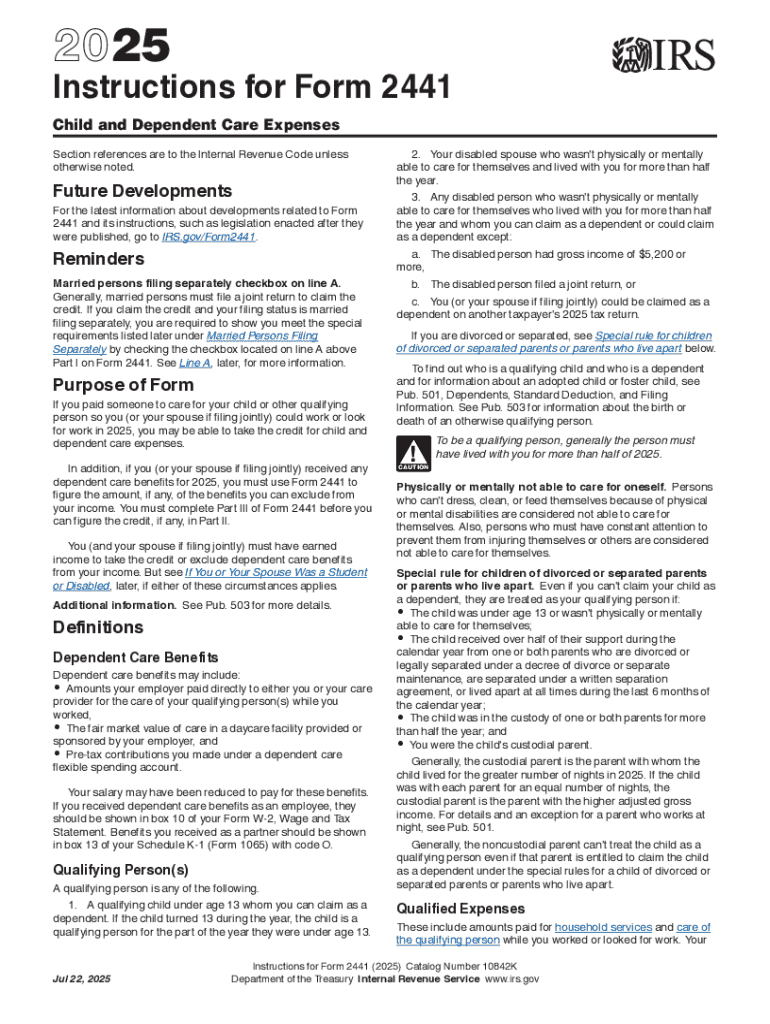
File IRS Form 2441 Child & Dependent Care Tax Credits
Use a File IRS Form 2441 Child & Dependent Care Tax Credits template to make your document workflow more streamlined.
What Form 2441 reports
Form 2441, Child and Dependent Care Expenses, reports qualifying care expenses and identifies the care provider so eligible taxpayers can calculate the child and dependent care credit on their federal income tax return. The filer generally enters dependent information, provider name and address, identifying number, qualifying expenses, and employer-provided benefits where applicable. The form supports the credit calculation; it is filed with the taxpayer’s federal return rather than serving as a standalone payment request. The IRS provides the form and instructions.
Who uses Form 2441
Individual taxpayers
Individuals and married couples report qualifying dependent-care expenses and provider details when claiming the federal child and dependent care credit.
Tax professionals
Tax professionals prepare Form 2441 packets, verify provider information, and retain signed records with the taxpayer’s federal return.
How Form 2441 works
Complete the provider and dependent information before carrying the allowable result into the federal tax return.
Confirm eligibility: Identify Complete fields: Enter details Apply limits: Calculate credit File records: Attach return
Complete Form 2441 online
Use this workflow to prepare, route, sign, and retain Form 2441 without losing the supporting audit evidence.
Upload form:
Upload the current IRS Form 2441 PDF to signNow. Check fields:
Use auto-detection, then verify every taxpayer and provider field. Send securely:
Send the prepared form to the authorized signer. Archive record:
Collect signatures and store the completion certificate.
Configure the Form 2441 workflow
Configure Form 2441 for controlled preparation, taxpayer signing, evidence capture, and retention aligned with federal tax-record requirements.
| Setting | Recommendation |
|---|---|
| Authentication method | Email link with SMS OTP |
| Signature type | Typed or drawn electronic signature |
| Audit trail | Enable completion certificate and event history |
| Document retention | Keep three years from filing under IRC §6501(a) |
| Encryption | TLS 1.2/1.3 and AES-256 |
 Best ROI. Our customers achieve an average 7x ROI within the first six months.
 Scales with your use cases. From SMBs to mid-market, airSlate SignNow delivers results for businesses of all sizes.
 Intuitive UI and API. Sign and send documents from your apps in minutes.
Review the Form 2441 audit trail
The audit trail preserves evidence surrounding preparation, signing, and storage of Form 2441 records.
Signer authentication:
Timestamp capture:
Document hashing:
Tamper-evident sealing:
Action logging:
Audit export:
Authenticate Form 2441 signers
PKI signatures:
X.509 certificates:
Two-factor authentication:
SMS OTP:
ID verification:
Signing evidence:
Platform requirements for Form 2441
Prepare Form 2441 in signNow using Chrome, Firefox, Safari, or Edge on Windows or macOS. signNow also provides mobile apps for iOS and Android, allowing authorized users to review and sign the tax document from supported devices.
Browser support Chrome, Firefox, Safari, and Edge Desktop systems Windows 10 or later, macOS Mobile access iOS and Android signNow apps
Organizations handling Form 2441 should use managed Windows, macOS, iOS, or Android devices, controlled access, and current browser security updates. Enterprise deployments can connect signNow through API access or SSO provisioning, while administrators should configure certificate and long-term validation requirements when their records policy requires them.



Best practices for Form 2441 records
Accurate fields, preserved audit evidence, and controlled retention make Form 2441 records easier to review and protect.
Verify every Form 2441 field
Export audit evidence with the signed form
Apply the federal tax retention rule
Archive sensitive tax records securely
Form 2441 processing stages
Move Form 2441 from preparation through signature and archival while preserving the tax-record evidence needed for review.
Prepare the document
Deliver to signer
Review and sign
Complete and archive
Form 2441 retention schedule
Keep Form 2441 and related evidence according to the federal assessment period, while checking for longer state requirements.
Three years from filing
Six years for major understatement
Indefinite for fraudulent returns
Indefinite without a return
State-required longer period
Risks when Form 2441 is incomplete
Credit calculation affected
Eligibility may be unsupported
IRS examination evidence weakened
Taxpayer privacy compromised
Protect Form 2441 information
Form 2441 may expose dependent names, care-provider details, addresses, and taxpayer identification information to unauthorized recipients. Consumer-facing electronic records require disclosure of paper-record rights and electronic-access capability under ESIGN 15 U.S.C. §7001(c). Sending the completed form to the wrong recipient can disclose care expenses and dependent information outside the intended tax workflow. Shared accounts or excessive permissions can let unauthorized staff view, modify, download, or forward Form 2441 records.
Why teams look for DocuSign alternatives
Organizations seek alternatives when they need different pricing models, stronger native automation, simpler bulk affidavit workflows, or more flexible identity-verification options than those available in a legacy envelope-based vendor.

Form 2441 troubleshooting questions
Resolve field, privacy, signing, retention, plan, and filing questions before finalizing Form 2441.
Upload the IRS PDF to signNow, then use its field-detection and editing tools to place taxpayer, preparer, date, and signature fields. Review every detected field against the current Form 2441 instructions before sending, because automated detection does not determine tax eligibility or calculate the credit.
Form 2441 contains sensitive dependent and care-provider information. Use role-based access, restrict download permissions, and enable an audit trail. signNow Business includes audit trails and templates; HIPAA compliance is relevant only when protected health information is present and requires a business associate agreement.
signNow supports electronic signatures under ESIGN and UETA, but those laws do not determine whether a taxpayer qualifies for the credit. The taxpayer remains responsible for accurate entries, supporting records, and filing Form 2441 with the applicable federal return.
The Business plan is listed at $8 per user per month when billed annually and includes legally binding eSignatures, audit trails, templates, and mobile apps. Business Premium adds bulk send at $15 per user per month annually; use it only if repeated Form 2441 packets require bulk delivery.
Use signNow’s completion certificate and audit trail to preserve timestamps, signer activity, and document history. For federal tax records, IRC §6501(a) generally supports a three-year retention period from filing, with longer periods applying in specified circumstances.
Form 2441 is part of the federal tax-return workflow. signNow can prepare, route, sign, and store the document, but the signer or tax professional must follow the IRS filing method and return instructions rather than treating signNow as the IRS submission channel.
Key performance indicators that demonstrate SignNow's proven track record.
BE READY TO GET MORE
Get this form now!

If you believe that this page should be taken down, please follow our DMCA take-down process.