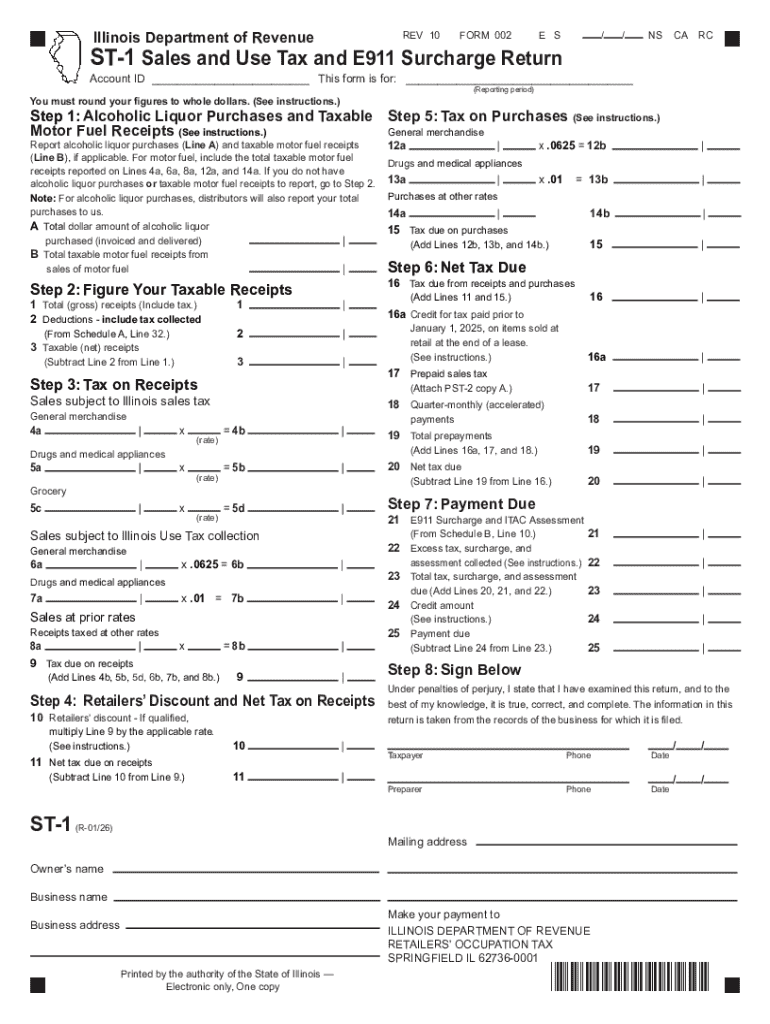
St 1, Sales And Use Tax And E911 Surcharge Return Sales And Use Tax And E911 Surcharge Return For Reporting Periods Beginning Ja Form
Use a ST 1, Sales And Use Tax And E911 Surcharge Return Sales And Use Tax And E911 Surcharge Return For Reporting Periods Beginning Ja template to make your document workflow more streamlined.
What the ST-1 return records
The ST-1 return reports a business’s sales and use tax and E911 surcharge activity for a specified reporting period. It organizes taxable sales, purchases subject to use tax, applicable tax calculations, credits, and the amount due or overpayment. The filer must use the reporting period shown on the form, reconcile totals to its books, and submit the completed return and payment through the responsible state tax agency’s process. signNow can help prepare, route, sign, and retain the completed document, but it does not determine tax liability or replace filing with the agency.
Who prepares and approves the ST-1
Tax departments
Businesses responsible for reporting sales and use tax use the ST-1 return to compile period totals, calculate tax and E911 surcharge amounts, and document the authorized representative’s approval.
Accounting teams
Accounting firms and finance teams can prepare client or company returns, reconcile source records, route signature approval, and preserve the executed return with its audit trail.
How to complete the ST-1 return
Use this workflow to prepare the ST-1 return, verify its tax figures, and preserve evidence of approval.
Upload the form:
Upload the ST-1 PDF and let signNow detect fillable fields. Complete tax fields:
Enter the reporting period, sales, use-tax, surcharge, and payment information. Reconcile totals:
Review calculated totals against accounting records and agency instructions. Route for signature:
Assign the authorized signer and send the return for signature. File and retain:
Download the signed return and submit it through the agency’s required channel.
How the ST-1 workflow works
The electronic workflow moves the ST-1 return from preparation through authorized approval and controlled retention.
Upload: Upload the ST-1 PDF to signNow. Prepare: Add or confirm fields for period, tax figures, and signature. Route: Send the prepared return to the authorized signer. Retain: Store the signed PDF and audit trail securely.
Ways to send and sign the ST-1
- Use the signNow web app when accounting staff need to upload the ST-1, map fields, reconcile figures, and route the return from a controlled desktop workflow.
- Use the signNow mobile app when an authorized representative must review and sign the prepared ST-1 away from the office, subject to device security controls.
- Use kiosk mode for supervised, on-site signing only when the organization’s configured workflow permits the representative to complete the approval at a shared device.
- Use a shareable signing link when the organization needs a controlled access path for an identified signer; verify identity and preserve the resulting audit trail.
 Best ROI. Our customers achieve an average 7x ROI within the first six months.
 Scales with your use cases. From SMBs to mid-market, airSlate SignNow delivers results for businesses of all sizes.
 Intuitive UI and API. Sign and send documents from your apps in minutes.
Recommended ST-1 workflow setup
Configure the ST-1 workflow around authorized signing, tax-record retention, controlled access, and an exportable audit history.
| Setting | Recommendation |
|---|---|
| Authentication method | Email link with SMS OTP |
| Signature type | Electronic signature with signer intent |
| Audit trail | Enabled with exportable completion evidence |
| Document retention | 3 years from filing under IRC §6501(a) |
| Encryption | TLS 1.2/1.3 and AES-256 at rest |
What the ST-1 audit trail records
The audit trail documents who handled the ST-1 return, when actions occurred, and how the completed record can be reviewed.
Authenticate signer:
Capture timestamp:
Hash document:
Seal record:
Log activity:
Export evidence:
Authentication for ST-1 signers
Signer authentication:
Two-factor authentication:
PKI certificates:
X.509 identity:
Identity verification:
Signing evidence:
Mobile options for ST-1 work
The signNow iOS and Android apps can help authorized staff review and sign the ST-1 return away from a desk. Use a supported current operating-system release, protect the device with its platform security controls, and verify the captured document before routing it.
Mobile apps signNow mobile apps for iOS and Android Offline signing Offline signing available on supported mobile workflows Camera capture Camera capture supports paper-return digitization
Mobile signing does not determine the correct tax period, taxable amounts, E911 surcharge, or filing destination. Keep the accounting review and agency submission under controlled procedures, and use managed devices when the return contains taxpayer or payment information.
ST-1 document retention schedule
Retention depends on the tax authority’s rule and the records supporting the return; confirm the applicable state requirement before deleting files.
3 years from filing
State-required period
Supporting workpapers period
Payment evidence period
Audit trail period
Risks from an inaccurate ST-1
Assessment exposure
Late-filing consequences
Payment dispute
Evidence weakness
Privacy and disclosure pitfalls
Uploading a return containing taxpayer identification or bank information to an unrestricted shared folder can expose sensitive filing data. Assigning signature fields without confirming the authorized business representative can weaken attribution and delay agency acceptance. Sending the completed return to unintended recipients may disclose sales, use-tax, surcharge, or payment information. Failing to preserve the signed PDF and audit trail can make later reconciliation or response to a tax inquiry harder.



Key performance indicators that demonstrate SignNow's proven track record.
ST-1 troubleshooting questions
These answers address field detection, signer control, filing evidence, retention, and signNow configuration for the ST-1 return.
Upload the ST-1 PDF again, confirm the file opens correctly, and use signNow’s field detection before manually checking every tax, surcharge, and signature field. Detection does not validate tax calculations, reporting periods, or state filing requirements, so reconcile those items against accounting records and agency instructions.
The Business plan includes legally binding eSignatures, templates, audit trails, and mobile apps at $8/user/month when billed annually. If the workflow requires bulk sending, Business Premium is listed at $15/user/month annually and adds bulk send; plan availability should be confirmed before routing returns.
signNow supports ESIGN and UETA compliance, but the tax agency’s submission rules still control. Complete the ST-1, obtain authorized approval, download the executed PDF, and submit it through the responsible state channel rather than treating a signature as proof of filing.
Use signNow’s SMS OTP or other configured signer authentication, then verify that the signer is the business representative authorized to approve the ST-1. The audit trail records authentication and signing activity, but the organization remains responsible for selecting the correct signer.
Preserve the signed ST-1, supporting workpapers, payment confirmation, and audit trail together. Federal tax records generally follow IRC §6501(a) for three years from filing, but state sales-tax rules may require longer retention; confirm the applicable state period.
For an ST-1 containing payment or taxpayer information, restrict template and document access by role, use encrypted transmission and AES-256 storage, and export the audit trail when the return is finalized. signNow states TLS 1.2/1.3, AES-256, SOC 2 Type II, and ISO 27001 capabilities.
BE READY TO GET MORE
Get this form now!

If you believe that this page should be taken down, please follow our DMCA take-down process.