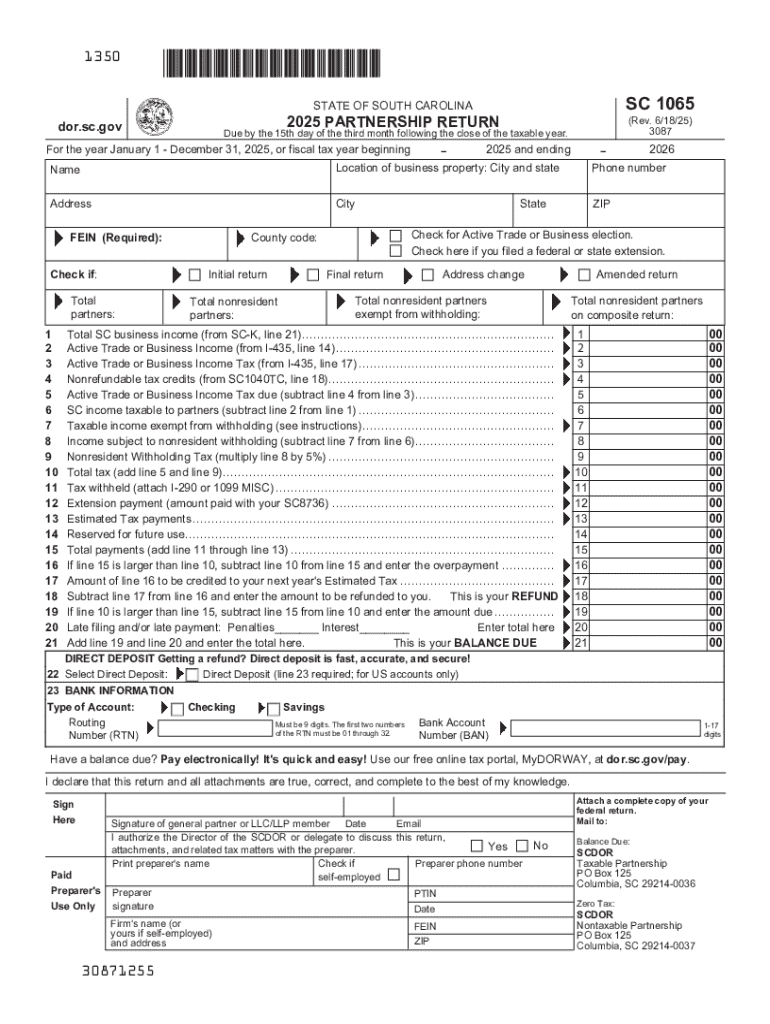
For The Year January 1 December 31, , Or Fiscal Tax Year Beginning Form
Use a For The Year January 1 December 31, , Or Fiscal Tax Year Beginning template to make your document workflow more streamlined.
What this reporting-period form does
This form identifies records for the period from January 1 through December 31 or for a fiscal tax year beginning on a specified date. Its exact fields, issuing authority, filing obligation, and signature requirements depend on the source document associated with that title. In signNow, upload the document, review automatically detected fillable fields, confirm the reporting period and signer assignments, send it for electronic signature, and retain the completed form with its audit trail. ESIGN and applicable state law may recognize electronic signatures when intent, consent, attribution, and reproducible records are established.
Who benefits from this period form
The form is useful wherever a business must identify and preserve a specific January 1–December 31 or fiscal tax-year record.
Independent contractors and small businesses use this period form to document the reporting year, collect required signatures, and retain a complete record for their tax files without exchanging paper copies. Accounting departments use the form when coordinating period-specific information with payers, vendors, or internal reviewers. signNow templates help standardize routing while leaving each year’s values subject to review. Enterprise finance teams use controlled workspaces and audit trails to route the form across departments, preserve signer evidence, and limit access to personnel handling the relevant reporting period.
These tasks are executed by both individual contributors and centralized administrators depending on organizational policy and required controls.
Key features for this period form
signNow connects document preparation, field assignment, signer routing, mobile review, and audit-trail preservation for this named reporting-period form.
Field detection
Upload the source document and review detected fields before assigning the reporting period, signer details, and signature locations. Manual field placement remains available when the source layout needs adjustment.
Signer routing
Send the completed form to named recipients by email or signing link. Each signer receives the assigned fields and can review the document before applying an electronic signature.
Audit trail
Capture signing events in an audit trail linked to the completed document. This gives the sender a structured record for internal review and evidence preservation under applicable law.
Mobile signing
Review and sign the reporting-period form from the signNow iOS or Android app. Mobile access supports teams that prepare or approve records away from a desktop workstation.
Reusable template
Use reusable templates when the same form structure recurs across reporting periods. Review period-specific values before sending so a prior year is not carried forward accidentally.
Controlled storage
Store the final form with its completion evidence in an organized workspace. Access controls help limit exposure of names, identification details, and other information contained in the document.
How this form workflow works
The workflow keeps the named reporting period visible from document preparation through signature and record preservation.
Upload form: Upload the source form into signNow. Check fields: Review detected fields and assign the reporting period. Route signing: Send assigned fields to each signer. Preserve record: Store the completed form with its audit trail.
 Best ROI. Our customers achieve an average 7x ROI within the first six months.
 Scales with your use cases. From SMBs to mid-market, airSlate SignNow delivers results for businesses of all sizes.
 Intuitive UI and API. Sign and send documents from your apps in minutes.
Steps to complete this form
Follow the source document’s instructions while using signNow to prepare, route, sign, and preserve the completed reporting-period form.
Upload:
Upload the source form. Check fields:
Review auto-detected fields. Assign signers:
Add signer recipients. Send:
Send the reporting-period form. Complete:
Collect signatures and store evidence.
Recommended setup for this form
Use a controlled signing workflow that preserves the reporting period, signer identity, completion evidence, and applicable tax-record retention requirement.
| Setting | Recommendation |
|---|---|
| Authentication method | Email invitation with SMS OTP |
| Signature type | Electronic signature with signer intent |
| Audit trail | Enable completion evidence export |
| Document retention | Three years from filing under IRC §6501(a) |
| Encryption | AES-256 at rest and TLS 1.2/1.3 in transit |
How the audit trail records this form
The audit trail preserves evidence about who handled the reporting-period form, what actions occurred, and when the completed record was finalized.
Authenticate signer:
Timestamp actions:
Hash document:
Seal record:
Connect evidence:
Export audit trail:
Security for this form
AES-256 at rest:
TLS 1.2 and 1.3:
SOC 2 Type II certified:
ISO 27001 certified:
GDPR compliant controls:
HIPAA compliant with BAA:
Platform requirements for this form
Complete the specified reporting-period form through signNow using Chrome, Firefox, Safari, or Edge on Windows or macOS. signNow also provides iOS and Android mobile apps for reviewing and signing.
Browsers Chrome, Firefox, Safari, Edge Desktop systems Windows and macOS desktop access Mobile apps iOS and Android signNow apps
Organizations should manage access through approved devices and user permissions. Confirm that the selected browser, mobile app, and network allow secure document access before sending this form. For regulated records, align authentication, retention, and audit-trail handling with the applicable agency or industry rule.
Record-keeping practices for this form
Preserve the completed form, signing evidence, and period-specific review record according to the underlying tax or business obligation.
Match retention to the underlying record
Export evidence after completion
Limit access by workflow role
Review every period field
Retention periods for this form
Keep the completed form according to the rule governing the underlying tax record and extend retention when an IRC §6501(a) exception or state requirement applies.
Three years from filing
Six years for major understatement
Indefinite retention for fraud
Indefinite retention without return
Longer period under state law
Risks when this form is mishandled
Wrong tax year
Incomplete audit trail
Insufficient retention
Unauthorized access
Troubleshooting this form workflow
Use these answers to resolve signing, field-detection, plan, and record-handling questions for the specified reporting-period form.
Upload the source document again in the signNow web app and confirm that its pages are readable. Business users can place fields manually when automatic detection does not identify the period, taxpayer details, or signature areas.
The Business plan includes legally binding eSignatures, templates, mobile apps, and audit trails. If this workflow requires bulk sending of the same period form, Business Premium adds bulk send and quick invite links.
A signer can open the email invitation or shareable signing link without creating a signNow account in many workflows. If stronger attribution is needed, configure SMS authentication or another available signer-authentication method.
Electronic-signature validity depends on intent, consent, attribution, and retention of a reproducible record under ESIGN and applicable state law. For consumer-facing records, address the disclosure requirements in 15 U.S.C. §7001(c).
The Business plan includes audit trails that record signing activity. Export the completed document and audit trail after signing, then apply the retention policy required for the underlying tax or business record.
Do not treat the form title alone as an IRS filing instruction. Confirm the issuing agency, requested tax year, filing deadline, and required fields on the actual source form before sending it.
Key performance indicators that demonstrate SignNow's proven track record.
BE READY TO GET MORE
Get this form now!

If you believe that this page should be taken down, please follow our DMCA take-down process.