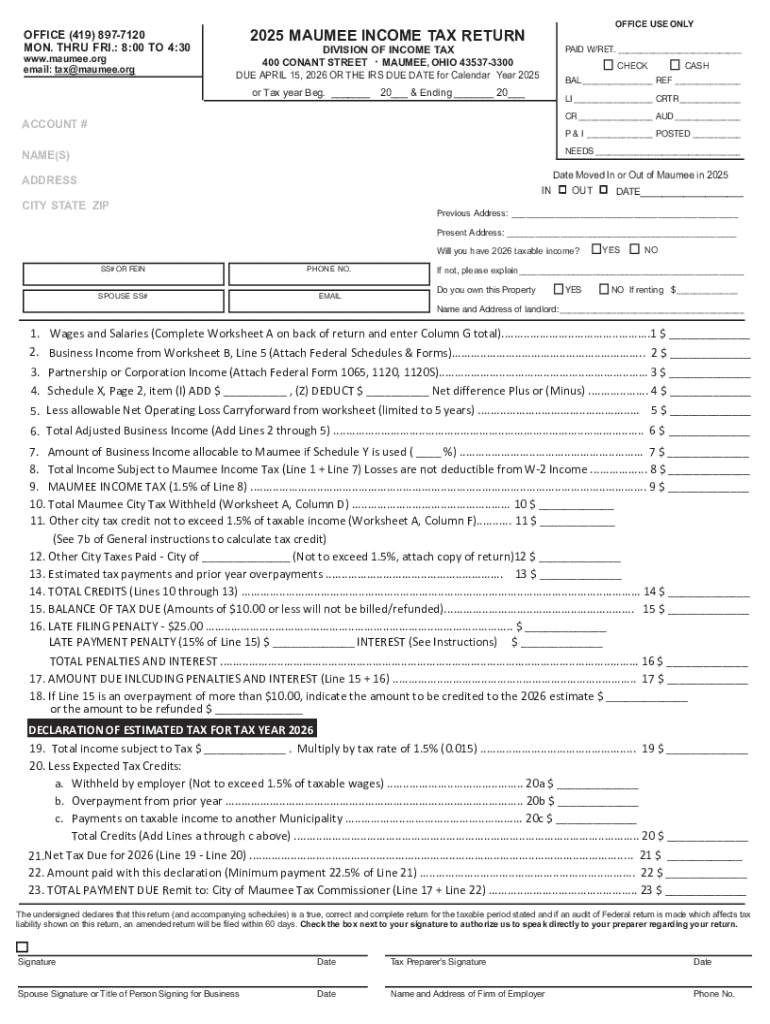
Maumee Jedz Tax Return Form
Use a Maumee JEDZ Tax Return template to make your document workflow more streamlined.
What Maumee Jedz Tax Return Form does
Maumee Jedz Tax Return Form is a tax-related document intended to collect and return information identified by its form name; the supplied record does not identify an IRS form number, issuing agency, required fields, filing deadline, or official instructions. In signNow, a sender uploads the document, checks its available fillable fields, adds signer and date fields where required, and sends it for completion. Recipients review the populated record, sign when authorized, and receive a completed copy. Confirm the form’s official instructions before relying on any tax treatment, filing method, or deadline.
Who may use this tax form
Financial services
Financial-services teams can use the form to collect taxpayer information, approvals, and signatures before accounting or payment workflows continue.
Business administration
Small businesses and tax professionals can route a completed record to an authorized signer, then preserve the signed document and audit trail.
How the form workflow works
Maumee Jedz Tax Return Form follows a controlled upload, field review, signature, and record-preservation sequence in signNow.
Upload document: The sender uploads Maumee Jedz Tax Return Form into signNow. Prepare fields: Detected fields are reviewed and corrected before routing. Collect signatures: Authorized recipients complete assigned fields and signatures. Preserve record: The completed document and audit trail are stored together.
How to complete the form online
Follow the document-specific workflow below, then verify the official instructions before filing or delivering the completed form.
Upload form:
Upload the intended PDF or document file. Check fields:
Review detected fields and add missing inputs. Assign roles:
Assign signer, date, and required fields. Send request:
Send the completed invitation through signNow. Complete record:
Review, sign, and save the completed record.
 Best ROI. Our customers achieve an average 7x ROI within the first six months.
 Scales with your use cases. From SMBs to mid-market, airSlate SignNow delivers results for businesses of all sizes.
 Intuitive UI and API. Sign and send documents from your apps in minutes.
Audit trail for Maumee Jedz Tax Return Form
The audit trail records who handled Maumee Jedz Tax Return Form, what happened, and when each signing event occurred.
Authenticate signer:
Capture timestamp:
Hash document:
Seal record:
Log activity:
Retrieve evidence:
Legal standing and evidentiary value
An electronic signature on Maumee Jedz Tax Return Form may carry legal effect when the signer intends to sign, consents to electronic records, can be identified, and the record is retained accurately under ESIGN, 15 U.S.C. chapter 96, and applicable UETA law. Those frameworks exclude wills, certain court filings, and specified family-law documents.

Processing stages for the tax form
The form moves from preparation through delivery, signing, and evidence-focused archival without assuming an unverified filing deadline.
Document preparation
Delivery to signers
Signer turnaround
Completion and archival
Retention periods to verify
The form’s official classification is not supplied, so apply these federal periods only after confirming which record class Maumee Jedz Tax Return Form represents.
Three years from filing
Six years for understatement
Indefinite fraud retention
Three years for payroll
State-specific period
Record-keeping practices for the form
Preserve both the signed Maumee Jedz Tax Return Form and the evidence needed to explain its completion, access, and retention.
Confirm the applicable retention period
Export the document and audit trail
Restrict access to taxpayer data
Document secure archival and disposal
Challenges when completing the form
The form name does not identify an official IRS form number, so filing instructions and tax treatment require confirmation. Missing taxpayer identifiers, dates, or signatures can make the completed record unusable for the recipient or payer. Sending an outdated template can produce inaccurate information even when every field is completed correctly. Retaining the signed form without its audit trail can weaken evidence of signer identity, intent, and document history.
Security for the tax form
Transport encryption:
Storage encryption:
Security certification:
Information security:
Electronic signatures:
Audit evidence:
Platform requirements for Maumee Jedz Tax Return Form
Complete Maumee Jedz Tax Return Form in a current browser on Windows or macOS, or review and sign it through signNow mobile apps for iOS and Android. Use an internet connection for document loading and signature events.
Supported browsers Use Chrome, Firefox, Safari, or Edge Operating systems Use Windows, macOS, iOS, or Android Supported devices Open PDFs on desktop, tablet, or phone
Use a managed device when the form contains taxpayer identification numbers, payment details, or other sensitive information. Confirm that your organization permits electronic records, configure signNow access controls, and retain the completed form and audit trail according to the applicable IRS or organizational policy.
Troubleshooting Maumee Jedz Tax Return Form
Resolve the specific document, signer, plan, and compliance questions that can interrupt this form’s electronic workflow.
Confirm the sender uploaded the intended Maumee Jedz Tax Return Form file and inspect detected fields before sending. signNow Business includes templates, legally binding eSignatures, and audit trails; field detection does not confirm the form’s tax accuracy or official status.
Check the recipient email, signing order, and required fields, then resend the invitation from signNow. Business includes audit trails, while Business Premium adds quick invite links and kiosk mode. The recipient may sign without creating an account, depending on the configured workflow.
Use a typed, drawn, or click-to-sign method only after the signer reviews the record and intends to sign. ESIGN and UETA require intent, consent, attribution, and reliable record retention; signNow’s audit trail documents the signing event but does not replace tax instructions.
A signNow Business subscription is listed at $8 per user monthly when billed annually and includes 100 signature invites per user annually. Confirm current usage and overage terms before sending high-volume tax documents; the Site License uses $1.50 per signature invite.
Do not treat signNow compliance as proof that this unidentified form satisfies an IRS filing rule. Verify the official agency instructions, taxpayer information, deadline, and delivery method separately, then use signNow to document the authorized electronic signing workflow.
For records containing protected health information, signNow lists HIPAA compliance with a BAA required. A tax form should be placed in a HIPAA workflow only when PHI is genuinely involved and the organization has completed its required safeguards.
Key performance indicators that demonstrate SignNow's proven track record.
BE READY TO GET MORE
Get this form now!

If you believe that this page should be taken down, please follow our DMCA take-down process.