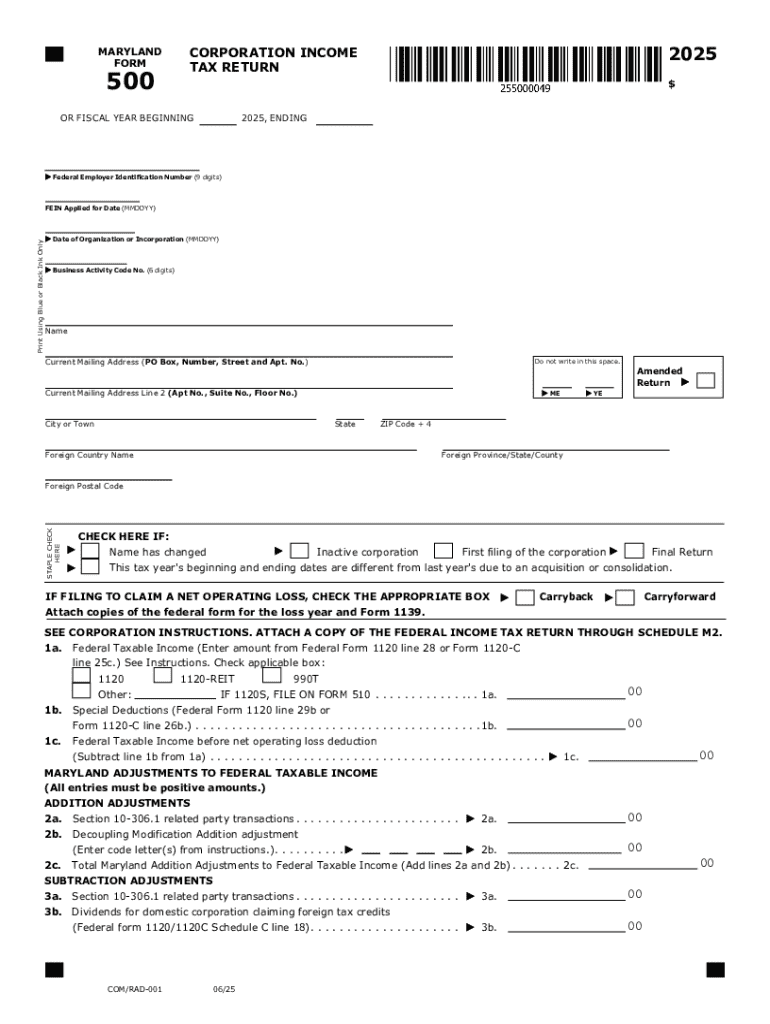
Maryland Form 500 Corporation Income Tax Return Tax Year Form 500
Use a Maryland Form 500 Corporation Income Tax Return Tax Year Form 500 template to make your document workflow more streamlined.
What Maryland Form 500 does
Maryland Form 500 is the corporation income tax return used to report a corporation’s Maryland taxable income and tax liability for a specified tax year. The return brings together federal income information, Maryland additions and subtractions, apportionment details when applicable, tax calculations, estimated payments, credits, and the resulting balance due or overpayment. The corporation or its authorized tax professional completes the return, reviews supporting schedules, and obtains an authorized signature. A signed electronic record may be handled under ESIGN and applicable Maryland electronic-transactions law, while filing instructions and submission requirements remain controlling.
Who prepares and signs Maryland Form 500
Corporate tax departments
Corporate tax departments use Form 500 to report a Maryland corporation’s income, modifications, apportionment, tax, payments, and balance due. They coordinate preparers, reviewers, and authorized signers while retaining schedules and evidence supporting the filed return.
Maryland tax professionals
CPA firms and enrolled tax professionals prepare Form 500 for Maryland corporate clients, collect missing data, review Maryland additions and subtractions, and route the completed return for authorized signature. signNow helps separate preparation, review, signature, and recordkeeping responsibilities.
How signNow handles Form 500
The signNow workflow keeps Form 500 preparation, authorization, signature, and evidence connected in one document sequence.
Upload return: Upload the Maryland Form 500 PDF. Check fields: Auto-detect fields, then verify required entries. Route signature: Send the reviewed return to its authorized signer. Archive record: Store the signed return with its audit trail.
Steps to complete Form 500 online
Use this focused workflow to prepare, route, sign, and preserve the Maryland Form 500 record in signNow.
Upload form:
Upload the completed Maryland Form 500 PDF. Check fields:
Verify detected fields and add signature details. Send return:
Send the return to the authorized signer. Save evidence:
Download the signed PDF and audit trail.
 Best ROI. Our customers achieve an average 7x ROI within the first six months.
 Scales with your use cases. From SMBs to mid-market, airSlate SignNow delivers results for businesses of all sizes.
 Intuitive UI and API. Sign and send documents from your apps in minutes.
How the Form 500 audit trail works
signNow records the evidence surrounding each Maryland Form 500 signature so the completed return and its signing history remain reviewable.
Authenticate signer:
Capture timestamps:
Hash document:
Seal document:
Log activity:
Export evidence:
Best practices for Maryland Form 500
Accurate preparation depends on reconciling Maryland-specific entries, reviewing signatures, and preserving the complete Form 500 filing record.
Reconcile federal and Maryland figures
Select the correct tax-year form
Review every required field
Archive the complete filing record
Security controls for Form 500
Transport encryption:
Stored encryption:
Security certification:
Information security:
Electronic signatures:
Health data controls:
Pricing considerations for Form 500 workflows
For a Maryland Form 500 workflow, signNow pricing is verified below; competitor figures are marked Not verified when the supplied source does not confirm them.
| Features | signNow | DocuSign | Adobe Sign | PandaDoc | Dropbox Sign |
|---|---|---|---|---|---|
| Starting price | $8/user/month, Business, annual billing | Not verified | Not verified | Not verified | Not verified |
| Free trial | 7 days, no credit card required | Not verified | Not verified | Not verified | Not verified |
| Bulk send | Business Premium, $15/user/month annually | Not verified | Not verified | Not verified | Not verified |
| Audit trail | Included with Business plan | Not verified | Not verified | Not verified | Not verified |
Features that support Form 500 completion
signNow features map to the practical tasks around Maryland Form 500: preparing the PDF, routing authorization, capturing evidence, and preserving the completed return.
PDF preparation
Upload the Maryland Form 500 PDF and review detected fields before routing it to the authorized signer. This keeps the document recognizable while reducing manual field placement during preparation.
Signer routing
Assign signature, date, and required fields to the person authorized to sign the corporation’s return. Clear assignments reduce the risk of an incomplete authorization package.
Audit trail
Capture timestamps and document activity in an audit trail linked to the signed Form 500. Reviewers can preserve the signing history with the final tax return.
Reusable template
Use templates for recurring Form 500 preparation while reviewing each tax year’s Maryland schedules and amounts individually. Templates standardize workflow structure without replacing tax judgment.
Mobile signing
Use mobile apps when an authorized signer must review the Maryland return away from a desk. The signer can inspect assigned fields and complete the document through the signNow workflow.
Record storage
Store the completed Form 500 and audit trail together after signature. This creates a more complete record for internal review, tax workpapers, and retention procedures.
Recommended Form 500 workflow setup
Use a controlled signing workflow that verifies the authorized signer, preserves evidence, and keeps the Maryland Form 500 record reproducible.
| Setting | Recommendation |
|---|---|
| Authentication method | Email with SMS OTP |
| Signature type | Electronic signature with intent |
| Audit trail | Enabled with completion certificate |
| Document retention | At least 3 years (IRC §6501(a)) |
| Encryption | TLS 1.2/1.3 and AES-256 |
Troubleshooting Maryland Form 500 workflows
Resolve Form 500 workflow questions by separating Maryland tax responsibility from signNow document, signature, access, and retention controls.
Business includes legally binding eSignatures, templates, audit trails, and mobile apps at $8/user/month with annual billing. Upload Form 500, verify its fields, assign the authorized signer, and retain the completed PDF and audit trail. signNow supports ESIGN and UETA compliance, but Maryland filing instructions still control submission.
Business Premium adds bulk send at $15/user/month with annual billing. It is relevant when a tax department distributes substantially similar Form 500 packages across multiple authorized signers. Confirm each corporation’s tax year, schedules, and signer assignment before sending because bulk delivery does not replace tax review.
A Maryland corporation’s electronic signature record should demonstrate intent, consent where required, attribution, and reliable retention and reproduction. signNow audit trails record signing events, while ESIGN, 15 U.S.C. ch. 96, and applicable Maryland law provide the legal framework; the platform does not determine filing acceptance.
If a signer cannot access the Form 500 fields, reopen the uploaded PDF and check field placement before sending. signNow templates and auto-detected fields can accelerate setup, but a human reviewer must verify Maryland-specific schedules, amounts, and signature assignments before completion.
Enterprise costs $30/user/month with annual billing and adds advanced signer authentication, formula fields, and conditional fields. Those controls can help route a reviewed Form 500 package, but they do not calculate Maryland tax or validate the corporation’s substantive filing positions.
The Business plan includes 100 signature invites per user per year, with overage fees applying after the allowance. A single Form 500 workflow may use one or more invites depending on routing; review current plan terms before estimating annual filing volume.
Key performance indicators that demonstrate SignNow's proven track record.
BE READY TO GET MORE
Get this form now!

If you believe that this page should be taken down, please follow our DMCA take-down process.