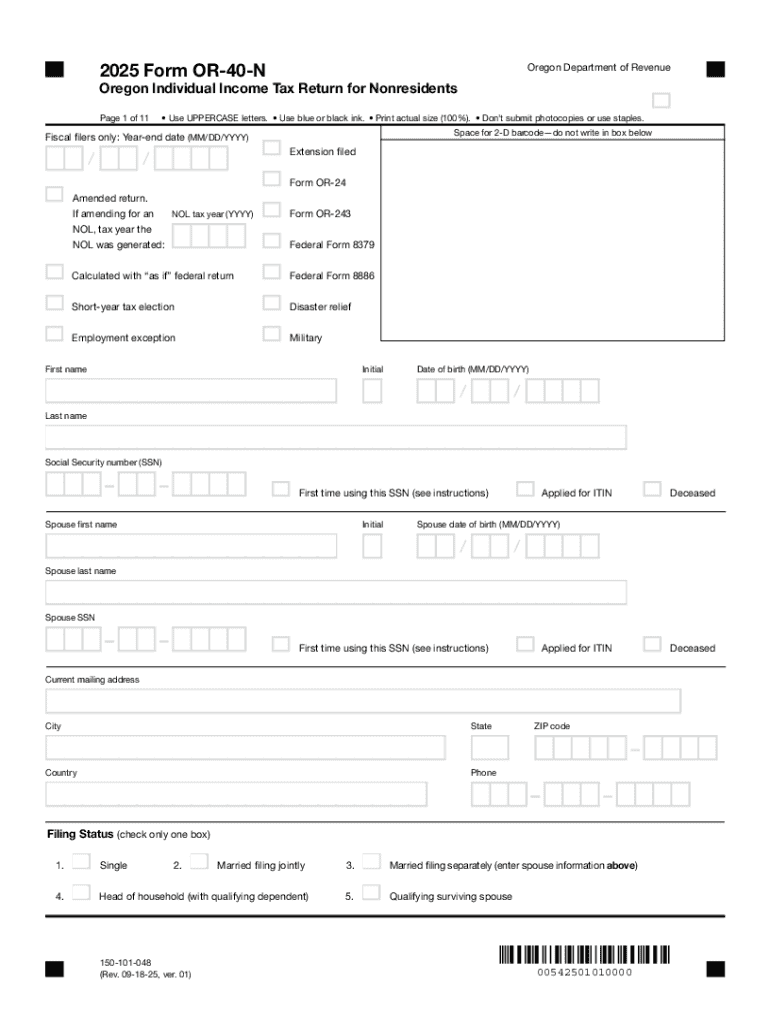
Form Or 40 N, Oregon Individual Income Tax Return
Use a Form OR 40 N, Oregon Individual Income Tax Return template to make your document workflow more streamlined.
What Form Or 40 N does
Form Or 40 N, Oregon Individual Income Tax Return is an Oregon individual tax return used to report the taxpayer information, income, adjustments, tax calculation, payments, and refund or balance details requested by the form. A filer or authorized preparer completes the applicable fields, reviews the figures, and signs the return before submission through the required Oregon process. signNow can convert the return into a routed electronic workflow by detecting fillable fields, assigning participants, capturing signatures, and preserving the completed document with an audit trail. Filing acceptance remains separate from electronic signing.
How Form Or 40 N works
Form Or 40 N moves from document preparation to signer review and secure recordkeeping through a documented signNow workflow.
Upload the return: Upload the Oregon return PDF and let signNow detect fillable fields. Check the fields: Review detected fields and add Oregon-specific taxpayer information. Send for signing: Send the completed return to authorized signers through signNow. Archive the return: Store the signed return with its audit trail for records.
Who benefits from Oregon return workflows
Different tax practices and finance teams use Form Or 40 N workflows to coordinate preparation, review, signatures, and controlled recordkeeping.
Solo tax practitioners can prepare individual Oregon returns, route taxpayer signatures, and preserve each completed return with its associated signNow audit trail for client records and review. Regional accounting firms can standardize recurring Oregon return workflows through reusable signNow templates, delegated sending, and controlled access for preparers, reviewers, and authorized signers. Enterprise finance departments can connect return workflows with systems such as NetSuite or Microsoft 365, while administrators manage users, permissions, and audit evidence across multiple teams.
These tasks are executed by both individual contributors and centralized administrators depending on organizational policy and required controls.
Quick steps for Form Or 40 N
Prepare the Oregon return carefully, then use signNow to route, sign, and preserve the completed document.
Add the form:
Upload the Oregon return PDF. Review entries:
Verify every detected taxpayer field. Set participants:
Assign authorized signers and recipients. Send securely:
Send the return through signNow.
Recommended Form Or 40 N setup
Configure the Oregon return workflow around controlled access, documented signer intent, audit evidence, and retention aligned with IRC §6501(a).
| Setting | Recommendation |
|---|---|
| Authentication method | Email verification with SMS OTP |
| Signature type | Intent-based electronic signature |
| Audit trail | Enable audit trail with encrypted storage |
| Document retention | Three years from filing under IRC §6501(a) |
| User provisioning | Assign role-based access to preparers |
 Best ROI. Our customers achieve an average 7x ROI within the first six months.
 Scales with your use cases. From SMBs to mid-market, airSlate SignNow delivers results for businesses of all sizes.
 Intuitive UI and API. Sign and send documents from your apps in minutes.



Mobile options for Oregon returns
Signers can review Form Or 40 N through signNow mobile apps for iOS and Android, while camera capture can convert paper records into uploadable documents. signNow encrypts data in transit with TLS 1.2/1.3 and at rest with AES-256.
Mobile apps iOS and Android apps Offline signing Offline signing available Document capture Camera document capture
Organizations should manage mobile access through assigned users, controlled templates, and appropriate signer authentication. Confirm that offline work synchronizes correctly before relying on the completed return, and preserve the final signed file and audit trail according to applicable tax-record policies.
Security for Oregon tax returns
Transport encryption:
Storage encryption:
Security certification:
Information security:
Privacy compliance:
Signature compliance:
Inside the Oregon return audit trail
signNow records technical events around the signed Form Or 40 N so authorized teams can review document history and preserve evidence.
Authenticate signer:
Timestamp signing:
Hash document:
Seal document:
Build audit trail:
Retrieve evidence:
Processing stages for Form Or 40 N
The processing sequence runs from accurate preparation through signer review, completion, and retention of the Oregon return and supporting audit evidence.
Prepare the document
Deliver to signers
Await signer review
Archive completion
Retention schedule for Oregon returns
Retain Form Or 40 N, its supporting records, and signing evidence according to the applicable federal period and any longer Oregon requirement.
Three years from filing
Six years for major understatement
Indefinite for fraud or nonfiling
Three years supporting records
State rules may extend retention
Recordkeeping practices for Oregon returns
Preserve the signed return, audit evidence, and filing context together while applying the federal retention rules in IRC §6501(a).
Apply the correct federal retention period
Export the audit trail with the return
Limit access to taxpayer information
Document filing year and submission status
Challenges when completing the Oregon return
A detected field can sit over the wrong Oregon return line, causing taxpayer information to appear in an unrelated field after upload. Unsigned preparer or taxpayer sections can delay submission when the return is routed without a complete participant and field review. A completed electronic signature does not itself confirm Oregon acceptance, so filers must separately follow the applicable submission instructions. Archived returns may lack supporting schedules or audit evidence when teams store only the signed PDF instead of the complete record.
Key performance indicators that demonstrate SignNow's proven track record.
Troubleshooting Form Or 40 N workflows
Resolve field, plan, authentication, and filing questions before sending an Oregon individual income tax return for signature.
Business includes legally binding eSignatures, templates, audit trails, and mobile apps. Its annual price is $8 per user per month. Confirm that your Oregon return workflow fits the plan’s 100 signature invites per user per year before sending repeated filing packages.
Business Premium adds bulk send, which can distribute substantially similar Oregon return packages to multiple recipients. It costs $15 per user per month when billed annually. Use it when repeated preparation requires separate signer invitations and individualized taxpayer data.
signNow supports electronic signatures under ESIGN and UETA. The signed return’s audit trail records signing activity, while Oregon filing rules and any tax authority submission requirements remain separate responsibilities. Review the completed document before submitting it through the required Oregon channel.
If detected fields do not align with the Oregon return PDF, correct the field placement manually before sending. Do not rely on automatic detection for tax calculations or eligibility decisions; verify every taxpayer entry against the source records and filing instructions.
Business plans include 100 signature invites per user per year, with overage fees after the included allocation. Check usage before a high-volume tax season. The Site License uses $1.50 per signature invite and is intended for organizations processing 1,000 or more documents annually.
For sensitive taxpayer information, configure signer authentication appropriate to the workflow and limit access to assigned recipients. signNow provides audit trails and encryption controls, while your organization remains responsible for confirming identity, consent, retention, and Oregon filing procedures.
BE READY TO GET MORE
Get this form now!

If you believe that this page should be taken down, please follow our DMCA take-down process.