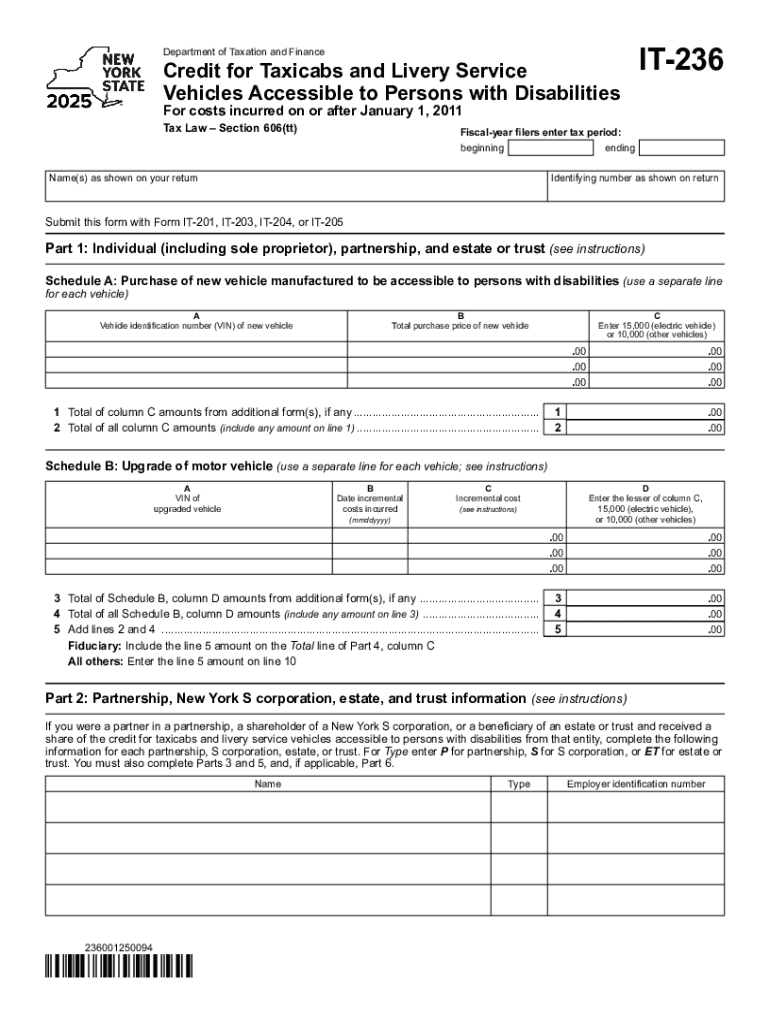
Form It 236 Credit For Taxicabs And Livery Service Vehicles Accessible To Persons With Disabilities Tax Year
Use a Form IT 236 Credit For Taxicabs And Livery Service Vehicles Accessible To Persons With Disabilities Tax Year template to make your document workflow more streamlined.
What Form IT-236 is and does
Form IT-236 is a tax form used to document a credit associated with taxicabs and livery service vehicles made accessible to persons with disabilities for the specified tax year. The filer should enter the requested taxpayer, vehicle, tax-year, and qualifying-cost information from reliable records, review the calculation, and obtain an authorized signature. signNow can upload the form, detect fillable fields, route it for review and signature, and preserve the completed PDF with an audit trail. The applicable tax authority and instructions, not signNow, determine eligibility and filing requirements.
Businesses that use Form IT-236
Form IT-236 is most useful where accessibility-related vehicle costs must be reviewed, certified, and retained with tax workpapers.
A taxi or livery operator can use Form IT-236 to organize vehicle-level accessibility-conversion costs and obtain an authorized signature after reviewing the tax-year records. The signed form and audit trail can remain with the operator’s return workpapers for later support or review. A tax preparer handling transportation businesses can upload the client’s Form IT-236, map fields, route it to the authorized taxpayer, and preserve the completed credit form with supporting invoices. Role-based access separates preparation from certification without requiring paper circulation. A fleet administrator at a transportation company can coordinate multiple vehicle records, approvals, and signer invitations through reusable signNow templates. The workflow helps distinguish each qualifying vehicle’s records while maintaining a signed copy and completion history for the tax team.
These tasks are executed by both individual contributors and centralized administrators depending on organizational policy and required controls.
How Form IT-236 works online
The signNow workflow turns Form IT-236 into a controlled sequence from document preparation through authorized signing and record storage.
Upload form: Upload the Form IT-236 file Detect fields: Auto-detect and review fillable fields Complete details: Enter tax-year and vehicle details Send for signature: Send the reviewed form for signature
Recommended Form IT-236 workflow setup
Configure Form IT-236 around authorized signing, tax-record retention, protected transmission, and a reproducible completion history.
| Setting | Recommendation |
|---|---|
| Authentication method | Email verification with SMS OTP |
| Signature type | Click-to-sign with signer intent |
| Audit trail | Enable completion history and export |
| Document retention | Three years under IRC §6501(a) |
| Encryption | TLS 1.2/1.3 and AES-256 |
 Best ROI. Our customers achieve an average 7x ROI within the first six months.
 Scales with your use cases. From SMBs to mid-market, airSlate SignNow delivers results for businesses of all sizes.
 Intuitive UI and API. Sign and send documents from your apps in minutes.
Key features for Form IT-236 workflows
signNow connects Form IT-236 preparation, review, signature, and evidence preservation in one document workflow.
Reusable form setup
Upload the Form IT-236 PDF, identify its fillable areas, and create a reusable preparation flow without rebuilding vehicle and tax-year fields for every transaction.
Role-based fields
Assign fields to the preparer, reviewer, and authorized signer so responsibility for entering, checking, and certifying Form IT-236 remains visible throughout the workflow.
Controlled signing
Send the completed form by email or signing link, allowing an authorized taxpayer to review the exact vehicle and credit information before signing.
Audit trail
Capture timestamps, signer actions, and completion history with the signed Form IT-236, creating a reproducible electronic record for tax workpapers.
Mobile access
Use signNow mobile apps when authorized staff review or sign Form IT-236 away from the office, while retaining the same completed-document record.
Organized archival
Store the final PDF and audit trail with supporting vehicle-cost records, supporting later reconciliation without relying on scattered email attachments.



Best practices for Form IT-236 records
Match expenses to the eligible vehicle:
Reconcile vehicle and cost details:
Limit access to tax records:
Archive the signed form securely:
Standardize secure file naming:
Confirm signer authority:
What the Form IT-236 audit trail records
A signNow audit trail documents the technical events that connect the completed Form IT-236 to its authorized signer and preserved tax record.
Authenticate signer:
Capture timestamps:
Protect document integrity:
Record signing events:
Export completion record:
Archive tax evidence:
Challenges when preparing Form IT-236
Vehicle-level accessibility costs may be entered against the wrong tax year or combined across vehicles, weakening the connection between Form IT-236 and supporting invoices. A preparer may send Form IT-236 before confirming that the signer is authorized to certify the taxpayer’s credit information. Incomplete vehicle descriptions, service dates, or conversion amounts can leave reviewers unable to reconcile the claimed credit with source records. Signed forms stored without their audit trail or supporting workpapers may be difficult to explain during a tax examination.
Record-keeping practices for Form IT-236
Preserve Form IT-236, supporting vehicle-cost evidence, and the signNow audit trail as one traceable tax record, using the applicable federal and state retention rules.
Retain records under the applicable tax period
Export the completion audit trail
Archive the final signed record
Document state retention decisions
Retention periods for Form IT-236 records
Keep Form IT-236 with the return, vehicle-cost evidence, and signed audit trail for the applicable federal or state tax-record period.
Three years: federal tax records
Six years: substantial omission
Indefinitely: fraudulent returns
Indefinitely: no return filed
State period: verify applicable rule
Legal standing of Form IT-236
Form IT-236 can be completed and signed electronically when the transaction permits electronic records and the signer demonstrates intent, consent, attribution, and record access under ESIGN and applicable state law, including UETA or New York’s ESRA. Wills, court orders, family-law decrees, and other statutory exclusions remain outside that framework.

Troubleshooting Form IT-236 signing
These answers address field detection, signer authority, plan selection, eligibility review, and record preservation for a Form IT-236 workflow.
Upload the original Form IT-236 PDF again and let signNow detect fields before manually placing missing fields. Review every detected field against the printed form because automatic detection does not determine tax eligibility or calculate the credit.
Assign the signature field to the taxpayer, owner, officer, or other person authorized under the applicable filing instructions. signNow can route the document, but the applicable tax authority determines who may certify Form IT-236.
Use a signNow plan and configuration that provides the required authentication. Business includes legally binding eSignatures and audit trails; stronger controls such as advanced signer authentication are available through Enterprise features or applicable add-ons.
The signNow Business plan is listed at $8 per user per month with annual billing. Business Premium is $15 and includes bulk send; Enterprise is $30 and adds advanced capabilities. Confirm the plan before routing repeated Form IT-236 documents.
Electronic signing does not decide whether the Form IT-236 credit is allowed. Confirm the tax year, qualifying vehicle details, accessibility costs, and filing instructions with the applicable tax authority or tax professional before signing.
Export the completed PDF and signNow audit trail after all required signatures finish. Retain them with supporting vehicle records under the applicable tax-record rule, including IRC §6501(a) where its three-year federal period applies.
Key performance indicators that demonstrate SignNow's proven track record.
BE READY TO GET MORE
Get this form now!

If you believe that this page should be taken down, please follow our DMCA take-down process.