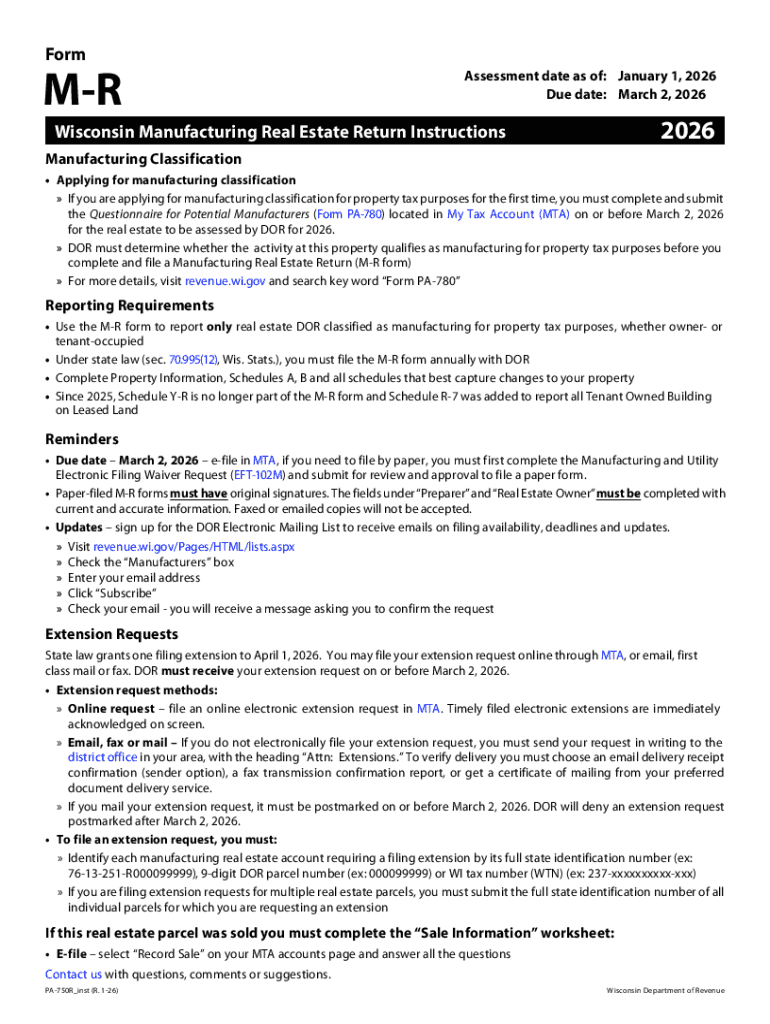
Wisconsin Manufacturing Real Estate Return Form
Use a Wisconsin Manufacturing Real Estate Return template to make your document workflow more streamlined.
What the Wisconsin manufacturing return form does
The Wisconsin Manufacturing Real Estate Return Form records information used in a Wisconsin manufacturing real estate transaction or return process. Its exact filing purpose, required fields, signing parties, and submission destination depend on the issuing Wisconsin authority and transaction. In signNow, a user uploads the source form, reviews automatically detected fillable fields, adds signatures and dates, assigns recipients, and sends the document. Signers complete it electronically where permitted, and the completed PDF can be stored with an audit trail. Confirm current Wisconsin instructions before filing or relying on the form.
Business types using this Wisconsin form
The form is most useful where Wisconsin real estate transactions require repeatable preparation, review, signature collection, and retrievable records.
A Wisconsin commercial property brokerage can use the form to collect transaction details and signatures from parties while keeping completed documents and audit trails together in signNow. A solo real estate attorney can prepare a reusable Wisconsin Manufacturing Real Estate Return Form template, review populated fields, and send each matter for signature without rebuilding the workflow. A regional property enterprise can centralize templates, delegate sending, and connect signNow with systems such as Salesforce, Microsoft Dynamics 365, or NetSuite for controlled document processing.
These tasks are executed by both individual contributors and centralized administrators depending on organizational policy and required controls.
Who uses this Wisconsin real estate form
Real estate
Wisconsin brokers and property managers can prepare transaction records, assign parties, and collect signatures while keeping the signed form linked to its audit trail.
Legal services
Legal and transaction teams can use controlled templates for repeatable Wisconsin property matters, while reviewing property-specific information before each document is sent.
How this Wisconsin form works in signNow
The signNow workflow converts the Wisconsin Manufacturing Real Estate Return Form into a controlled digital signing process while preserving the completed document and audit trail.
Upload: Upload the Wisconsin form Map fields: Detect and review fields Send: Assign parties and send Complete: Sign and preserve records
 Best ROI. Our customers achieve an average 7x ROI within the first six months.
 Scales with your use cases. From SMBs to mid-market, airSlate SignNow delivers results for businesses of all sizes.
 Intuitive UI and API. Sign and send documents from your apps in minutes.
Quick steps for completing this form
Prepare the Wisconsin Manufacturing Real Estate Return Form in signNow by checking fields, assigning participants, and preserving the signed record.
Upload:
Upload the source PDF Check fields:
Review detected fields Assign:
Add signer assignments Send:
Send for signature Archive:
Download the completed record
Ways to send and sign this Wisconsin form
- Use the signNow web app to upload the Wisconsin Manufacturing Real Estate Return Form, map fields, assign recipients, and send it from a desktop browser.
- Use the signNow mobile app when property staff or transaction participants need to review and sign the Wisconsin form from an iOS or Android device.
- Use kiosk mode for an in-person signing station when multiple parties complete the form on one managed device under staff supervision.
- Generate a shareable signing link when the same approved Wisconsin form must be distributed through a controlled channel without entering each recipient manually.
Recommended setup for this Wisconsin form
Use a controlled signing workflow that matches the Wisconsin form’s participants, filing instructions, and applicable record-retention policy.
| Setting | Recommendation |
|---|---|
| Authentication method | Email link with SMS OTP |
| Signature type | Electronic signature with signer intent |
| Audit trail | Enable and export with completed PDF |
| Document retention | Follow Wisconsin transaction policy |
| Encryption | TLS 1.2/1.3 and AES-256 |
Best practices for this Wisconsin form
Accurate field mapping, controlled sending, and complete records reduce avoidable delays when processing the Wisconsin Manufacturing Real Estate Return Form.
Verify every Wisconsin form field before sending
Assign recipients to each required signature field
Export the completed form and audit trail
Control template access and delegated sending
Platform requirements for this form
Use signNow through Chrome, Firefox, Safari, or Edge on Windows or macOS. The signNow mobile apps support iOS and Android devices for reviewing and signing the Wisconsin Manufacturing Real Estate Return Form.
Browsers Chrome, Firefox, Safari, Edge Desktop Windows and macOS desktops Mobile iOS and Android apps
Organizations deploying this form should manage user access, recipient permissions, and storage policies through their signNow administration. Confirm that the selected device can display the entire Wisconsin form clearly, that required fields remain accessible, and that the final PDF and audit trail can be exported to the organization’s approved records system.
What the signNow audit trail records
For the Wisconsin form, the audit trail documents signing activity separately from the initial upload and field setup.
Authenticate:
Timestamp:
Hash document:
Seal record:
Track actions:
Export trail:
Signer authentication and certificates
Two-factor authentication:
Signer identity checks:
Digital certificates:
Certificate evidence:
Audit trail:
Document protection:
Troubleshooting Wisconsin Manufacturing Return Forms
Resolve field assignment, consent, authentication, audit-trail, and plan-limit questions before sending this Wisconsin form for signature.
Business plan users can upload the Wisconsin Manufacturing Real Estate Return Form, place fields, and send it for signature. Business includes templates, audit trails, mobile apps, and legally binding eSignatures under ESIGN and UETA.
Business Premium adds bulk send and quick invite links, which help distribute repeated Wisconsin Manufacturing Real Estate Return Forms. Business supports individual sends, while Enterprise adds advanced signer authentication and conditional fields.
A missing signer email or incorrectly assigned field can prevent completion. Reopen the document in signNow, confirm each recipient, and check that required signature, date, and initials fields belong to the intended signer.
For consumer-facing transactions, ESIGN requires disclosure of electronic-record rights and access procedures under 15 U.S.C. §7001(c). Include the required disclosure before requesting a signature; signNow provides the signing workflow and audit trail.
Business and Business Premium include audit trails. After signing, download the completed Wisconsin Manufacturing Real Estate Return Form and its audit trail from signNow for records that show actions, timestamps, and signer activity.
SignNow subscription plans include 100 signature invites per user annually, with overage fees. The Site License uses $1.50 per signature invite and unlimited users, making its pricing model different from Business, Business Premium, and Enterprise.
Key performance indicators that demonstrate SignNow's proven track record.
BE READY TO GET MORE
Get this form now!

If you believe that this page should be taken down, please follow our DMCA take-down process.