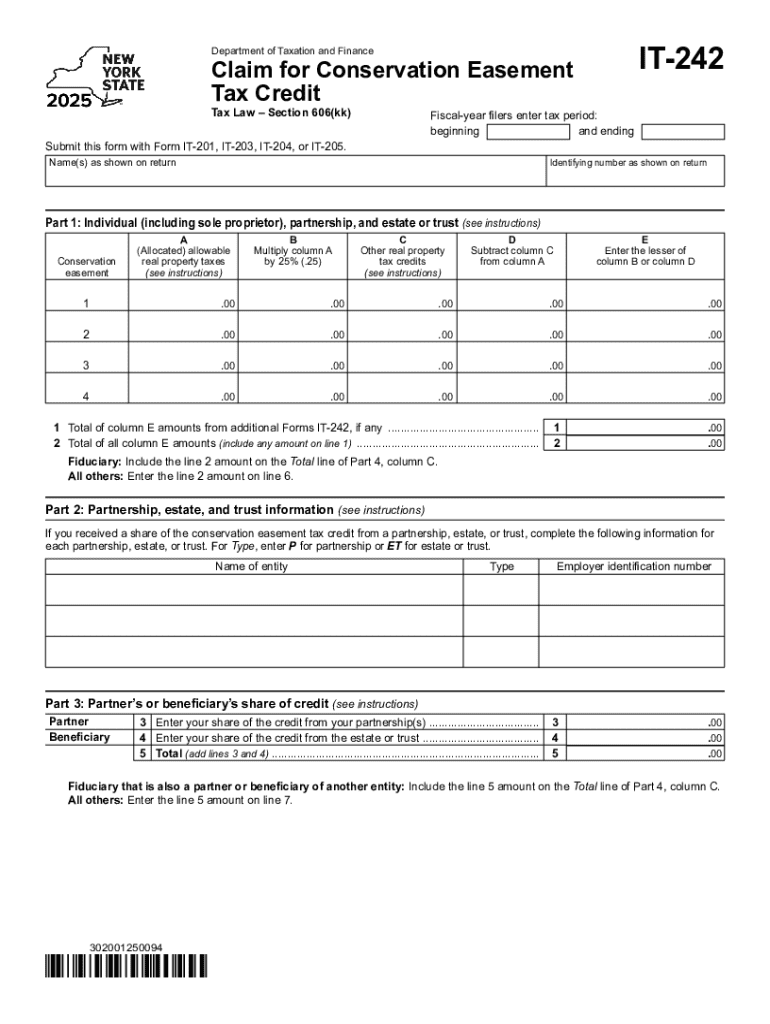
Form It 242 Claim For Conservation Easement Tax Credit Tax Year
Use a Form IT 242 Claim For Conservation Easement Tax Credit Tax Year template to make your document workflow more streamlined.
What Form IT-242 does
Form IT-242 is a tax-credit claim used to report a conservation easement credit for the identified tax year. The filer enters the property and taxpayer information, describes the qualifying easement, reports the calculated credit, and signs the completed claim for submission with the applicable tax records. Because the exact credit amount depends on the underlying property documentation and governing state requirements, the signer should reconcile every entry with the easement instrument, appraisal, and supporting workpapers before signing. signNow can route the prepared form, capture signer activity, and preserve the completed record with an audit trail.
Who completes Form IT-242
Property owners
Property owners and conservation organizations can use Form IT-242 to document the tax year, qualifying conservation easement information, and claimed credit for review with supporting records.
Tax professionals
Tax preparers and authorized representatives can prepare, review, and route Form IT-242 while preserving the signed claim and audit evidence for the related tax filing.
Businesses that use Form IT-242
Form IT-242 is most useful when property, tax, and conservation records must move through a documented review and signature process.
A conservation-focused property owner can use Form IT-242 to organize the tax-year claim, authorize review, and preserve a signed record alongside the easement documentation and credit calculation. A regional tax practice can route multiple Form IT-242 claims to property owners, standardize required fields, and retain audit trails with each client’s conservation-credit workpapers. An enterprise land-conservation organization can use shared templates, delegated sending, and controlled permissions when coordinating Form IT-242 reviews across properties, tax years, and authorized representatives.
These tasks are executed by both individual contributors and centralized administrators depending on organizational policy and required controls.
How to complete Form IT-242
Prepare the conservation-credit information first, then use signNow to route the completed Form IT-242 through review, signature, and record storage.
Upload the form:
Upload the Form IT-242 PDF to signNow. Check fields:
Review detected fields and add missing fields. Add recipients:
Assign taxpayer and reviewer recipients. Send for signing:
Send the claim for electronic signature. Store records:
Download the signed claim and audit trail.
 Best ROI. Our customers achieve an average 7x ROI within the first six months.
 Scales with your use cases. From SMBs to mid-market, airSlate SignNow delivers results for businesses of all sizes.
 Intuitive UI and API. Sign and send documents from your apps in minutes.
Recommended Form IT-242 workflow
Use a controlled signing workflow that connects Form IT-242 with its conservation easement evidence and tax-record retention requirements.
| Setting | Recommendation |
|---|---|
| Authentication method | Email invitation with SMS OTP |
| Signature type | Electronic signature with signer intent |
| Audit trail | Export completion certificate and event history |
| Document retention | Three years under IRC §6501(a) |
| Encryption | TLS 1.2/1.3 and AES-256 |
Audit-trail events for Form IT-242
The audit trail records evidence around the Form IT-242 signing event, helping reviewers connect the final claim with signer actions and document history.
Authenticate the signer:
Capture timestamps:
Protect document integrity:
Seal the record:
Review the history:
Export evidence:
Best practices for Form IT-242
Accurate property records, controlled review, and a complete audit file help support the conservation easement tax credit claim.
Verify every tax-year field
Reconcile credit calculations
Assign controlled signing roles
Preserve the filing package
Form IT-242 processing stages
Processing depends on document readiness and signer response; the form does not establish a universal turnaround deadline.
Prepare the claim
Route to signers
Complete assigned fields
Complete and archive
Risks of inaccurate Form IT-242 claims
Incorrect credit amount
Missing easement records
Wrong tax year
Incomplete audit trail
Security for Form IT-242 records
TLS protection:
AES-256 encryption:
SOC 2 Type II:
ISO 27001:
ESIGN and UETA:
Two-factor authentication:



Platform requirements for Form IT-242
Complete Form IT-242 in signNow through Chrome, Firefox, Safari, or Edge on Windows or macOS. signNow also provides iOS and Android mobile apps for reviewing and signing assigned documents.
Supported browsers Chrome, Firefox, Safari, and Edge Desktop operating systems Windows and macOS desktops Mobile platforms iOS and Android mobile apps
Use an organization-managed device when the claim contains taxpayer identification, property information, or financial records. Administrators should control account access, downloaded copies, integrations, and retention outside the signing workspace according to applicable tax-record policies.
Form IT-242 troubleshooting questions
Resolve field, signer, consent, plan, and record-retention questions before treating the completed Form IT-242 as part of a tax filing package.
Upload the original Form IT-242 PDF again, then review signNow’s detected fields before sending. If fields remain missing, add signature, date, and text fields manually and confirm each recipient’s role.
The Business plan includes legally binding eSignatures, templates, audit trails, and mobile apps. Use Business Premium when bulk sending is required, or Enterprise when advanced signer authentication and conditional fields are needed.
SignNow supports ESIGN and UETA requirements, including signer intent, electronic consent, attribution, and record retention. Confirm any tax-office, state-law, or filing-specific requirements separately before relying on an electronic signature.
Use signNow’s recipient roles and signing order to separate taxpayer approval from preparer review. Do not route the claim until the intended signer’s authority and email address have been confirmed.
Download the completed Form IT-242 and its audit trail after signing. Store both with the supporting easement records and tax return; IRC §6501(a) generally uses a three-year assessment period.
For taxpayer or consumer-facing electronic records, review the ESIGN consumer-disclosure requirements in 15 U.S.C. §7001(c), including paper-record access and consent withdrawal procedures, before sending the claim electronically.
Key performance indicators that demonstrate SignNow's proven track record.
BE READY TO GET MORE
Get this form now!

If you believe that this page should be taken down, please follow our DMCA take-down process.