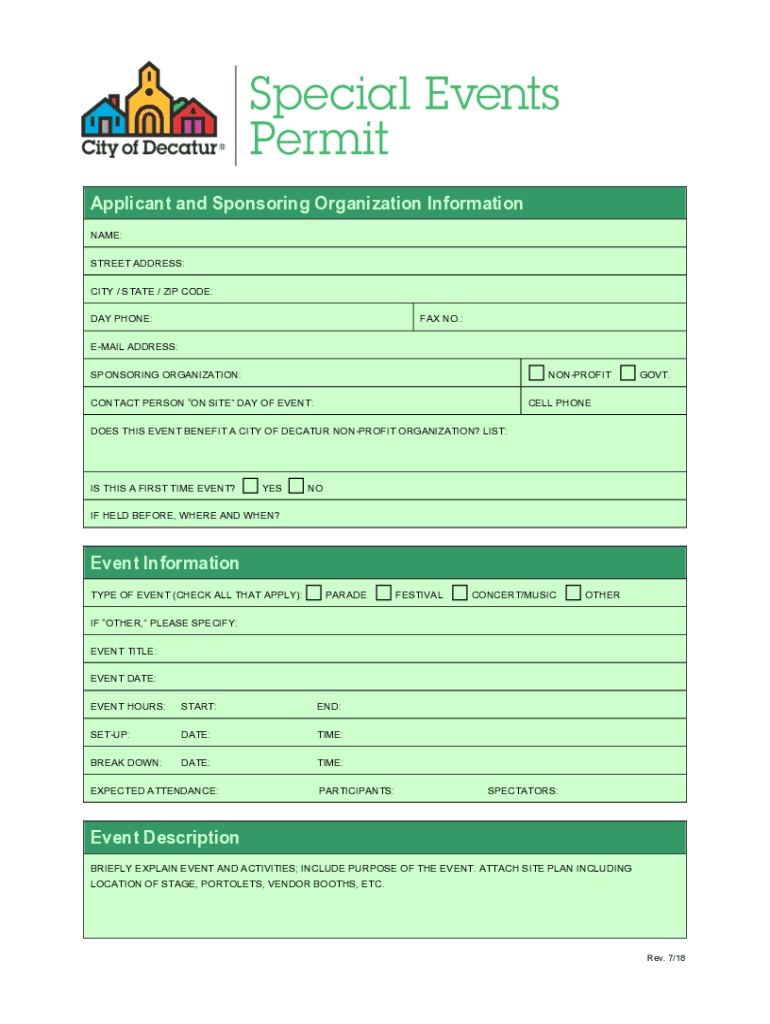
City Of Decatur Special Event Application Form
Use a City Of Decatur Special Event Application template to make your document workflow more streamlined.
What the Decatur special event application does
The City Of Decatur Special Event Application Form is the document organizers use to provide event information to the City of Decatur for municipal review. It captures the applicant’s identity, event description, location, dates, contacts, and other details required by the city’s application process. With signNow, an organizer uploads the form, reviews automatically detected fillable fields, assigns completion or signature fields, and sends it to the responsible participants. Each signer can review and complete assigned sections online. After completion, the signed PDF and audit trail can be downloaded for submission and recordkeeping.
Business types that benefit from this form
The City Of Decatur Special Event Application Form serves organizations seeking a documented, coordinated way to request approval for local events.
A Decatur restaurant or venue operator can prepare event dates, location details, attendance estimates, and organizer information before collecting the responsible manager’s signature for municipal review. A neighborhood association or nonprofit can coordinate a public gathering application across volunteers, preserve approvals, and keep one signed record instead of circulating separate paper copies. A larger event production company can use reusable signNow templates, delegated sending, and audit trails to manage multiple City of Decatur applications without losing signer accountability.
These tasks are executed by both individual contributors and centralized administrators depending on organizational policy and required controls.
Who uses the Decatur event application
Event organizers
Event organizers use the form to identify the applicant, describe the event, provide dates and locations, and submit required operational details for municipal review.
Applicant organizations
Businesses, nonprofits, and community groups use it to request approval for public gatherings while maintaining a signed record of submitted event information.
How to complete the application
Complete the City of Decatur application in signNow by preparing event details, assigning signers, and preserving the final submission record.
Upload form:
Upload the City of Decatur application PDF to signNow. Check fields:
Review detected fields and add missing applicant details. Assign signers:
Assign signature and completion fields to responsible applicants. Send form:
Send the completed application for review and signature. Store record:
Download the signed copy and retain its audit trail.
 Best ROI. Our customers achieve an average 7x ROI within the first six months.
 Scales with your use cases. From SMBs to mid-market, airSlate SignNow delivers results for businesses of all sizes.
 Intuitive UI and API. Sign and send documents from your apps in minutes.
Features for completing the application
signNow connects the City Of Decatur application’s preparation, signature collection, and recordkeeping steps in one controlled digital workflow.
Form preparation
Upload the City Of Decatur application and let signNow identify fillable areas, reducing manual field placement before event organizers review the document.
Role assignment
Assign applicant, organizer, and approval fields to named recipients so each person completes only the information connected to their role.
Flexible delivery
Send the application by email or signing link when participants are working from different locations or need a controlled signing route.
Mobile signing
Use mobile apps to review and sign event paperwork from a venue, office, or field location without printing the application.
Audit trail
Capture timestamps, signer activity, and document history in an audit trail that supports later review of the submitted application.
Record storage
Store the completed PDF with its supporting signing record, helping organizations retrieve the exact version sent for municipal processing.
Challenges when preparing the form
Applicants omit event dates, venue information, organizer contacts, or attendance details, leaving municipal reviewers without information needed to evaluate the request. Multiple organizers edit separate copies of the application, creating inconsistent event descriptions and uncertainty about which version represents the final submission. Required signatures are assigned to the wrong person, delaying completion when an organizer or authorized representative must correct the application. The signed PDF is saved without its audit trail, making it harder to demonstrate who completed each field and when the application was finalized.
Ways to send and sign the application
- Use the web app when the organizer is preparing the City Of Decatur application on a desktop and needs to review every event field before sending it.
- Use the mobile app when an organizer must review or sign the application from a venue, office, or other event-planning location.
- Use kiosk mode when multiple participants need to complete assigned portions on one controlled device during an organized intake session.
- Use a shareable signing link when applicants need a direct, controlled path to the assigned City Of Decatur application without searching through email threads.
Recommended application workflow setup
Configure the City Of Decatur application around verified signer identity, assigned responsibilities, audit evidence, and controlled retention.
| Setting | Recommendation |
|---|---|
| Authentication method | Email verification with SMS OTP |
| Signature type | Typed or drawn electronic signature |
| Audit trail | Export with the completed PDF |
| Document retention | Follow Georgia and municipal records policy |
| Encryption | TLS 1.2/1.3 and AES-256 |
What the audit trail records
The audit trail separates the City Of Decatur application’s signing evidence from the form fields themselves, creating a traceable record of completion.
Authenticate signer:
Record timestamps:
Hash document:
Seal document:
Export evidence:
Retrieve record:
Signer authentication and security
Signer authentication:
Digital certificates:
Two-factor access:
SMS OTP:
ID verification:
Signing evidence:
Platform requirements for the application
Prepare the City Of Decatur application in Chrome, Firefox, Safari, or Edge on Windows or macOS. signNow also provides iOS and Android apps for reviewing, completing, and signing the form from supported mobile devices.
Web browsers Chrome, Firefox, Safari, and Edge Operating systems Windows, macOS, iOS, and Android Mobile apps signNow iOS and Android apps
Organizations using managed devices should control access through their identity and device policies, then confirm that signNow users can open the application, complete assigned fields, and download the signed PDF. Enterprise deployments may also evaluate API access, SSO provisioning, and authentication requirements before handling repeated municipal applications.
Processing stages for the application
The City Of Decatur application has four practical processing stages; the city-specific filing deadline should be confirmed with Decatur officials.
Prepare the document
Send to signers
Collect signatures
Archive the submission
Questions about the Decatur application workflow
These answers address field preparation, electronic signing, plan limits, authentication, and recordkeeping for the City Of Decatur Special Event Application Form.
Upload the City Of Decatur application as a PDF, then review signNow’s detected fields. If a field is missed, add it manually and assign it to the organizer or authorized signer before sending.
The Business plan includes templates and audit trails, while Business Premium adds bulk send. For one City Of Decatur application, use a template or upload the document directly; bulk send is unnecessary unless sending repeated forms.
signNow supports ESIGN and UETA requirements, including intent, attribution, consent, and record retention. For a consumer-facing workflow, provide the required electronic-record disclosure under 15 U.S.C. §7001(c).
Use assigned fields and a defined signing order so the organizer completes event information before the authorized signer approves it. The audit trail records actions, timestamps, and signer activity for the finalized application.
Business is listed at $8 per user per month with annual billing and includes 100 signature invites per user per year. Additional invites may incur overage fees, so review expected application volume before deployment.
Download the completed PDF and its audit trail after signing. Retain them under the organization’s event-record policy, while checking Georgia and City of Decatur requirements if the application becomes part of an official municipal record.
Key performance indicators that demonstrate SignNow's proven track record.
BE READY TO GET MORE
Get this form now!

If you believe that this page should be taken down, please follow our DMCA take-down process.