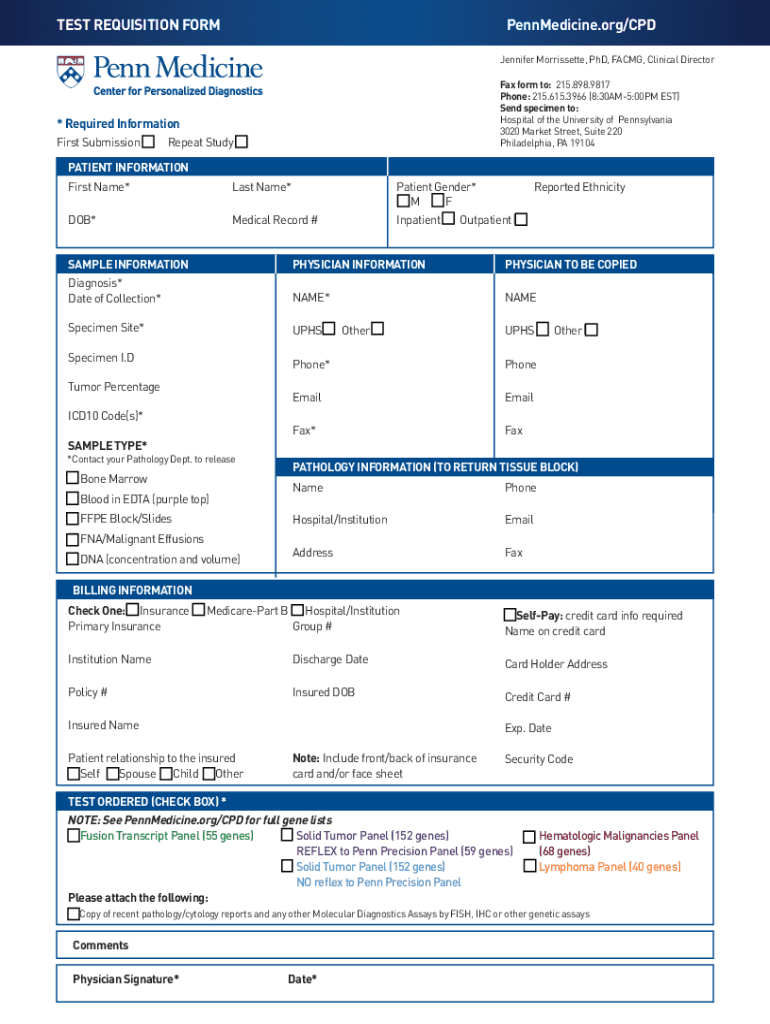
Pennmedicine Test Requisition Form
Use a PennMedicine Test Requisition Form template to make your document workflow more streamlined.
What the Pennmedicine test requisition form does
The Pennmedicine Test Requisition Form is a healthcare document used to request specified laboratory testing for a patient. It records identifying information, ordering-provider details, requested tests, diagnosis or clinical indications, specimen information, and billing details when required by the issuing workflow. With signNow, an authorized staff member can upload the form, place or confirm fillable fields, route it to the appropriate signer, and preserve the completed record with an audit trail. The receiving laboratory still determines whether the submitted requisition contains everything needed for processing.
Audiences and document use cases
Medical practices
Independent physicians and outpatient clinics use the Pennmedicine requisition for laboratory orders, provider authorization, patient details, and specimen instructions. signNow helps staff route the exact document, collect an electronic signature, and retain completion evidence without repeatedly rekeying the request. The laboratory’s own intake rules remain controlling.
Healthcare organizations
Hospital departments, diagnostic centers, and laboratory operations teams use the form when several people handle patient, test, specimen, and billing information. A controlled signNow workflow can separate preparation, provider approval, and records access while preserving an audit trail for the completed requisition.
Who benefits from this requisition workflow
The form is most useful where healthcare staff must collect accurate patient, provider, test, specimen, and authorization information before laboratory processing.
Solo medical practices can use the requisition to collect ordering-provider approval, organize patient and test details, and send a complete record to the receiving laboratory without repeatedly printing paper copies. Hospital and outpatient laboratory teams can route requisitions among ordering providers, patient-facing staff, and records personnel while preserving a searchable signed copy and audit trail for each testing request. Enterprise healthcare networks can standardize requisition templates, limit access by role, and connect signed records with approved systems while applying HIPAA safeguards and organization-specific provider-authorization policies.
These tasks are executed by both individual contributors and centralized administrators depending on organizational policy and required controls.
Features that support requisition handling
signNow organizes the Pennmedicine requisition workflow around accurate fields, authorized signatures, audit evidence, controlled access, and retention.
Form preparation
Upload the existing Pennmedicine requisition and preserve its original layout while adding signNow fields for required patient, provider, test, specimen, and signature information.
Signer routing
Route the requisition to an authorized provider or designated signer by email or signing link, reducing manual handoffs while keeping the workflow tied to the specific document.
Audit trail
Capture timestamps, signer activity, and completion history in an audit trail that can accompany the signed requisition during internal review or records management.
Access control
Use role-based access and recipient controls to reduce unnecessary exposure of patient information while the requisition moves between clinical and administrative staff.
Secure retention
Retain the signed requisition and completion evidence in an approved workspace, subject to the healthcare organization’s HIPAA, state-law, and records-retention requirements.
System connections
Connect signNow with Google Drive, Box, Egnyte, Microsoft 365, or approved enterprise systems to organize completed requisitions without manually downloading every record.
Recommended requisition workflow settings
Configure the Pennmedicine requisition workflow around signer identity, evidence capture, protected health information, and documented records retention.
| Setting | Recommendation |
|---|---|
| Authentication method | Email plus SMS verification |
| Signature type | Authorized electronic signature |
| Audit trail | Enabled for every requisition |
| Document retention | Six years for HIPAA records |
| Encryption | AES-256 at rest, TLS 1.2/1.3 transit |
 Best ROI. Our customers achieve an average 7x ROI within the first six months.
 Scales with your use cases. From SMBs to mid-market, airSlate SignNow delivers results for businesses of all sizes.
 Intuitive UI and API. Sign and send documents from your apps in minutes.
Complete the Pennmedicine requisition online
Use this sequence to prepare, route, sign, and retain the Pennmedicine Test Requisition Form without changing its clinical or billing information.
Upload form:
Upload the Pennmedicine requisition PDF to signNow. Check fields:
Confirm patient, provider, test, and specimen fields. Add recipients:
Assign the authorized signer and required recipients. Send form:
Send the requisition through the signing workflow. Store record:
Review the signed copy and audit trail.
How the requisition audit trail is recorded
The audit trail connects each Pennmedicine requisition action to a signer, timestamp, document state, and retrievable completion record.
Authenticate signer:
Capture timestamps:
Hash document:
Seal record:
Log activity:
Export evidence:
Security controls for requisition records
Data at rest:
Data in transit:
Healthcare compliance:
Service assurance:
Security certification:
Regulated records:
Privacy and disclosure pitfalls
Patient identifiers copied incorrectly can link the requested test to the wrong record or delay laboratory intake. Sending PHI to an unintended recipient can create an avoidable disclosure and require incident review under organizational privacy procedures. Missing patient consent or provider authorization can prevent the receiving laboratory from accepting the requisition. Broad workspace permissions can expose requisitions and audit trails to staff without a need to access them.



Platform requirements for this form
The Pennmedicine Test Requisition Form can be prepared in signNow using Chrome, Firefox, Safari, or Edge on Windows or macOS. signNow also provides mobile apps for iOS and Android, allowing authorized staff to review and sign the requisition from supported mobile devices. Use a secure connection and an organization-approved device when the document contains patient information.
Browsers Chrome, Firefox, Safari, and Edge Operating systems Windows, macOS, iOS, and Android Mobile apps signNow mobile apps on iOS and Android
Healthcare administrators should manage access through approved accounts, role permissions, and organizational policies. Regulated deployments may also require SSO provisioning, API controls, a HIPAA BAA, and documented retention procedures. Confirm that the selected signNow plan and integrations meet the organization’s privacy, laboratory-intake, and records-management requirements before production use.
Retention periods for signed requisition records
Apply the record class that actually covers the Pennmedicine requisition and verify whether state law or organizational policy requires a longer period.
Six years for HIPAA records
Three years for tax records
Six years for major understatement
Three years for payroll records
Five years for injury records
Best practices for signed requisitions
Accurate fields, limited access, preserved audit evidence, and authority-based retention keep this healthcare requisition usable after signing.
Verify every clinical field before sending
Preserve the requisition and audit evidence
Apply the HIPAA retention rule
Protect PHI during routing and storage
Troubleshoot Pennmedicine requisition workflows
Resolve signing, privacy, retention, and laboratory-intake issues by checking the document fields, signer controls, and applicable healthcare requirements.
The Business plan includes templates, audit trails, mobile apps, and legally binding eSignatures. Upload the Pennmedicine requisition, confirm its fields, and use signNow’s audit trail to document signer activity. HIPAA workflows require a business associate agreement where protected health information is handled.
Business Premium adds bulk send and kiosk mode, which can help a healthcare organization route repeated requisitions or support supervised signing. It does not replace laboratory requirements, provider credentials, patient consent rules, or verification of the receiving facility’s submission process.
If the form contains protected health information, signNow identifies HIPAA compliance as requiring a BAA. Confirm that the appropriate agreement and organizational safeguards are in place before sending patient information, and limit recipients to those involved in the requisition workflow.
Advanced signer authentication is listed with Enterprise, while Site License can add HIPAA and related regulated-workflow options. Select authentication based on your organization’s patient-identity and provider-authorization policy rather than assuming email access alone proves identity.
The completed document and audit trail should be retained according to the healthcare organization’s records policy and applicable law. HIPAA-covered records require six years from creation or the last effective date under 45 CFR 164.530(j); state rules may require longer.
The Pennmedicine Test Requisition Form is not a substitute for the laboratory’s intake rules. If a laboratory rejects an incomplete requisition, check patient identifiers, ordering-provider information, requested tests, specimen details, diagnosis or indication fields, and any required signature before resending.
Key performance indicators that demonstrate SignNow's proven track record.
BE READY TO GET MORE
Get this form now!

If you believe that this page should be taken down, please follow our DMCA take-down process.