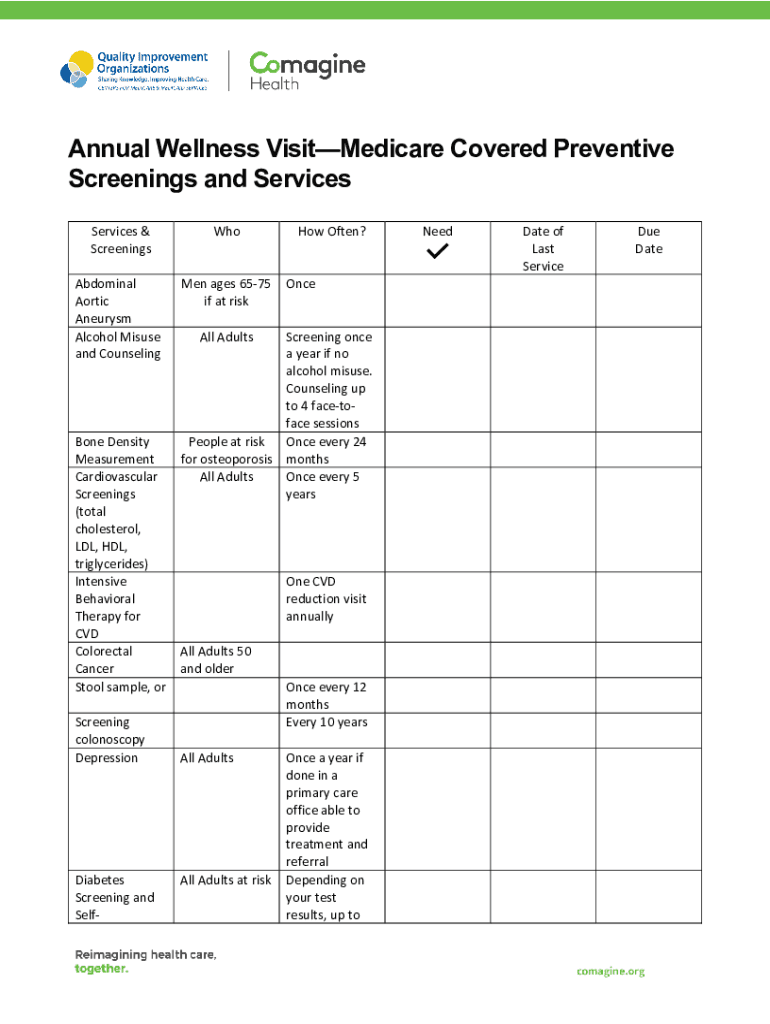
Medicare Annual Wellness Visit Form
Use a Medicare Annual Wellness Visit Form template to make your document workflow more streamlined.
What the wellness visit form records
The Medicare Annual Wellness Visit Form records the preventive-care information, health-risk assessment, planning details, patient acknowledgments, and signatures associated with a Medicare wellness visit. A healthcare practice prepares the form, enters the patient-specific information, and sends designated fields for completion. signNow can upload the form, detect fillable fields, route it to the patient, capture an electronic signature, and preserve the completed document with an audit trail. HIPAA-covered practices should apply appropriate safeguards and retain required documentation under 45 CFR §164.530(j).
Business types using the wellness visit form
Healthcare organizations use this form to document preventive visits, collect patient acknowledgments, and preserve a reliable electronic record.
Solo primary-care practices use the Medicare Annual Wellness Visit Form to document preventive planning, health-risk assessments, and patient acknowledgments without routing paper between exam rooms and billing staff. Multi-location healthcare groups use shared Medicare Annual Wellness Visit Form templates to collect patient signatures consistently, while administrators control access and preserve completed records for compliance review. Home-health coordinators and visiting clinicians can send the Medicare Annual Wellness Visit Form from mobile devices, helping patients complete required wellness documentation when an office visit is impractical.
These tasks are executed by both individual contributors and centralized administrators depending on organizational policy and required controls.
Features for wellness visit documentation
signNow connects the Medicare Annual Wellness Visit Form’s patient-facing fields with electronic delivery, signing, audit evidence, and controlled storage.
Field detection
Upload the Medicare Annual Wellness Visit Form and review detected fillable areas before adding patient, provider, date, and acknowledgment fields.
Flexible delivery
Route the form to a patient or authorized representative by email, signing link, mobile workflow, or clinic kiosk.
Patient signing
Collect signatures and dates electronically while preserving the signer’s intent and the sequence of form activity.
Reusable template
Use templates to keep preventive-visit questions, acknowledgments, and signature placement consistent across clinicians and locations.
Audit trail
Preserve the signed form with an audit trail containing authentication, timestamps, actions, and completion evidence.
HIPAA workflow
Apply HIPAA-compliant controls with a Business Associate Agreement when the workflow handles protected health information.
How the wellness form moves
The signNow workflow takes the Medicare Annual Wellness Visit Form from upload through field preparation, patient signing, and auditable storage.
Upload form: Upload the Medicare Annual Wellness Visit Form and let signNow detect its fillable areas. Map fields: Add patient, provider, date, acknowledgment, and signature fields to the appropriate sections. Send form: Send the completed preparation to the patient through email, a link, mobile, or kiosk. Archive record: Collect the signature, finalize the record, and store the completed form with its audit trail.
Complete the wellness visit form
Prepare the Medicare Annual Wellness Visit Form in signNow using these focused steps.
Upload form:
Upload form Add patient fields:
Add patient fields Send securely:
Send securely Store completion:
Store completion
 Best ROI. Our customers achieve an average 7x ROI within the first six months.
 Scales with your use cases. From SMBs to mid-market, airSlate SignNow delivers results for businesses of all sizes.
 Intuitive UI and API. Sign and send documents from your apps in minutes.
Choose the right signing method
- Use the signNow web app when staff prepare the Medicare Annual Wellness Visit Form on a desktop, review detected fields, and send it through an organized workflow.
- Use the mobile app when clinicians or patients complete wellness documentation on a phone or tablet during an office, home, or community-based encounter.
- Use kiosk mode at a clinic check-in desk when patients need to complete and sign the Medicare Annual Wellness Visit Form on a managed device.
- Use a shareable signing link when a practice distributes the same wellness-visit template through a patient portal, email, or appointment reminder.
Protect wellness visit records
HIPAA protection:
Encrypted storage:
Encrypted transit:
Independent assurance:
Security certification:
Traceable activity:
Review the audit trail
The audit trail records evidence around the Medicare Annual Wellness Visit Form rather than replacing the form’s clinical content.
Authenticate signer:
Capture timestamps:
Hash document:
Seal record:
Link events:
Export evidence:
Configure the wellness form workflow
Use a controlled configuration for patient authentication, electronic signing, audit evidence, protected storage, and administrator access.
| Setting | Recommendation |
|---|---|
| Authentication method | Email verification with SMS OTP |
| Signature type | Typed or drawn electronic signature |
| Audit trail | Enabled with completion certificate |
| Document retention | 6 years (HIPAA 45 CFR 164.530(j)) |
| Encryption | TLS 1.2/1.3 and AES-256 |
Platform requirements for signing
The Medicare Annual Wellness Visit Form can be prepared and signed through supported web browsers using TLS-secured connections. signNow also provides mobile apps for iOS and Android, allowing patients and healthcare staff to review and sign from supported phones or tablets.
Supported browsers Chrome, Firefox, Safari, and Edge Desktop systems Windows and macOS desktops Mobile access iOS and Android mobile apps
Healthcare organizations should use managed Windows or macOS workstations for staff preparation and controlled iOS or Android devices for mobile signing. Administrators handling protected health information should also configure access permissions, user provisioning, audit-trail retention, and any required HIPAA Business Associate Agreement before production use.
Avoid privacy and disclosure mistakes
Sending a completed wellness form to the wrong recipient can expose protected health information beyond the patient-care team authorized to view it. Electronic delivery without the required consumer disclosure can undermine consent for receiving the Medicare Annual Wellness Visit Form digitally under 15 U.S.C. §7001(c). Shared staff accounts make it difficult to attribute who prepared, sent, or changed a patient’s wellness-visit document. Saving the signed form without its audit trail can weaken evidence of patient identity, intent, timestamps, and completion history.
Retention schedule for wellness records
Retain the Medicare Annual Wellness Visit Form and related evidence according to HIPAA, state medical-record rules, payer requirements, and organizational policy.
6 years: HIPAA records
State rule: medical records
Consent: retain evidence
Completion: archive package
Policy review: before deletion
Legal value of signed wellness records
A completed Medicare Annual Wellness Visit Form can support an electronic record when the signer shows intent, consents to electronic records, and the practice preserves attribution and reproducibility. ESIGN and UETA generally recognize qualifying electronic signatures, but wills, certain court orders, and family-law decrees remain excluded under federal law.

Troubleshoot wellness form workflows
These answers address plan limits, patient consent, authentication, and retention questions specific to electronic wellness-visit records.
Business includes legally binding eSignatures, templates, mobile apps, and audit trails at $8/user/month with annual billing. A 7-day free trial is available without a credit card. The practice must still configure its clinical workflow and retention policy.
Yes. signNow is HIPAA compliant when a Business Associate Agreement is required and executed. A practice should confirm its account configuration, access controls, and handling of protected health information before sending patient records.
Business Premium adds bulk send and kiosk mode at $15/user/month with annual billing. Kiosk mode can suit clinic check-in, while bulk send helps distribute repeated wellness-visit documents to multiple patients.
Advanced signer authentication is listed with Enterprise at $30/user/month with annual billing. Depending on the configured workflow, practices can use stronger authentication controls for patient identity and sensitive wellness records.
Consumer-facing electronic records require disclosure of the right to receive paper, electronic-access capability, and withdrawal procedures under 15 U.S.C. §7001(c). Obtain appropriate consent before using electronic delivery for the patient form.
HIPAA requires covered entities to retain required documentation for six years from creation or its last effective date under 45 CFR §164.530(j). State medical-record rules or payer policies may require longer retention.
Key performance indicators that demonstrate SignNow's proven track record.
BE READY TO GET MORE
Get this form now!

If you believe that this page should be taken down, please follow our DMCA take-down process.