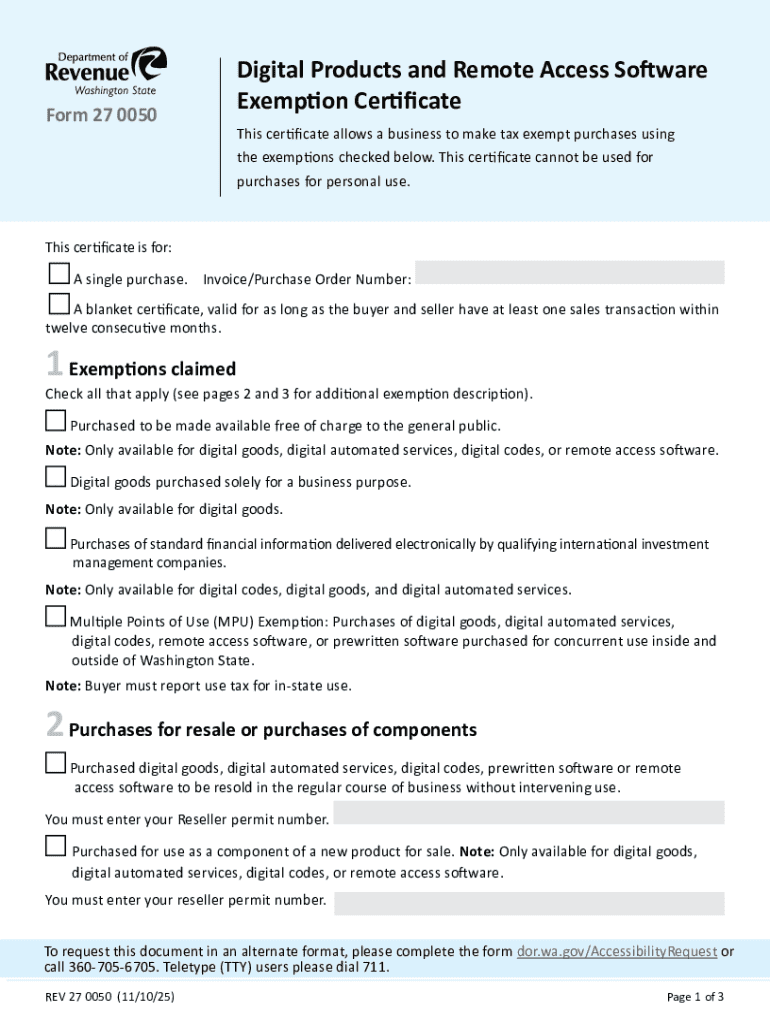
Form 27 0050 Digital Products And Remote Access Software Exemption Certificate
Use a Form 27 0050 Digital Products And Remote Access Software Exemption Certificate template to make your document workflow more streamlined.
What this exemption certificate does
Form 27 0050 Digital Products And Remote Access Software Exemption Certificate is a transaction record used to document an exemption involving digital products and remote access software. The purchaser or authorized representative provides the required business and transaction information, identifies the exemption basis, and signs the certificate for the seller’s records. In signNow, the document can be uploaded, checked for fillable fields, routed to assigned signers, and completed electronically when the transaction allows electronic records. The final certificate should remain linked to its audit trail and related transaction evidence.
Businesses that use this certificate
The certificate is most useful where software vendors, purchasers, and finance teams must document a transaction-specific exemption decision.
Independent software consultants use the certificate when documenting qualifying digital products or remote-access services for business customers, keeping transaction details and authorization in one signed record rather than exchanging scanned copies. Finance teams at technology vendors collect and review certificates from purchasers, using reusable signNow templates and audit trails to standardize approvals across invoices, contracts, and customer accounts. Enterprise procurement departments coordinate multiple authorized signers, preserve completed certificates with transaction records, and connect signNow workflows to systems such as NetSuite or Salesforce when supported by their deployment.
These tasks are executed by both individual contributors and centralized administrators depending on organizational policy and required controls.
Challenges when completing this certificate
Identifying the transaction and exemption basis can be difficult when product access and software services appear together. Missing purchaser information, seller details, or authorization creates avoidable gaps in the certificate record. Using an outdated template can leave required certificate fields incomplete or inconsistent with current business procedures. Sharing the completed certificate without its audit trail makes later verification of signing activity more difficult.
How this certificate workflow works
The signNow workflow moves Form 27 0050 from an uploaded template to a signed, reviewable certificate record.
Upload document: Upload the Form 27 0050 certificate. Detect fields: Auto-detect fillable certificate fields. Assign signers: Assign purchaser and seller signing roles. Archive record: Store the completed certificate and audit trail.
 Best ROI. Our customers achieve an average 7x ROI within the first six months.
 Scales with your use cases. From SMBs to mid-market, airSlate SignNow delivers results for businesses of all sizes.
 Intuitive UI and API. Sign and send documents from your apps in minutes.
Steps to complete this certificate
Use this sequence to prepare, route, sign, and retain Form 27 0050 Digital Products And Remote Access Software Exemption Certificate in signNow.
Upload form:
Upload the completed certificate template. Review fields:
Review detected fields and add missing fields. Assign roles:
Assign purchaser and seller signing roles. Send document:
Send the certificate through signNow. Store evidence:
Store the signed certificate with its audit trail.
How the certificate audit trail works
signNow records signer activity and document integrity events so the completed exemption certificate can be reviewed later.
Authenticate signer:
Capture timestamp:
Hash document:
Seal record:
Log actions:
Export evidence:
Features for completing the certificate
signNow combines field preparation, signer routing, audit evidence, and record storage for organizations processing Form 27 0050 certificates.
Field preparation
Upload the certificate, review detected fields, and add missing purchaser or seller fields before routing the document for signatures.
Signer roles
Assign signing roles so each authorized participant receives only the fields associated with their certificate responsibilities.
Flexible delivery
Send the certificate by email or supported signing link, keeping the workflow digital when the transaction permits electronic records.
Audit evidence
Capture timestamps, signer actions, and document history in an audit trail attached to the completed certificate.
Reusable templates
Use reusable templates for recurring digital-product and remote-access transactions while reviewing transaction-specific details each time.
Record retention
Retain a completed certificate and its signing evidence in a controlled repository for later transaction review.
Security for certificate records
Data encryption:
SOC 2 Type II:
ISO 27001:
Transport security:
Stored encryption:
Electronic signing:
Mobile options for this certificate
Use signNow on iOS and Android through its mobile apps; TLS-secured access supports completing and signing the exemption certificate away from a desk.
Mobile apps iOS and Android apps Offline mode Offline signing available Camera capture Camera document capture
Mobile workflows help purchasers review certificate details, sign when authorized, and return the completed record without printing. Confirm your organization’s offline-signing and camera-capture configuration before relying on those functions for this certificate.
Legal standing of the certificate
A completed Form 27 0050 certificate can provide transaction evidence when the signer demonstrates intent, consents to electronic records, and the record remains reproducible. ESIGN and UETA support electronic signatures for covered business transactions, but they do not override exclusions such as wills, certain court filings, or family law decrees.

Risks of incomplete exemption certificates
Tax treatment
Incomplete details
Missing signature
Record control
Troubleshooting this certificate workflow
These answers address field setup, electronic-signature evidence, plan selection, authentication, retention, and compliance questions for Form 27 0050.
Upload the certificate as a supported document, then use signNow’s field-detection workflow to review every required purchaser, seller, transaction, and signature field before sending. If detection misses a field, place it manually and test the completed document.
The Business plan includes legally binding eSignatures and audit trails at $8/user/month when billed annually. Business Premium adds bulk send at $15/user/month. Select the plan based on volume and required workflow controls.
ESIGN and UETA generally support electronic signatures when intent, consent, attribution, and record reproduction are established. Confirm the transaction is not subject to an exclusion or a state-specific requirement before using electronic signing.
Use signNow’s signer authentication options, including SMS-based verification where configured, to strengthen attribution. A stronger authentication method does not replace reviewing the purchaser’s authority or confirming the certificate’s underlying exemption basis.
Export the completed certificate and audit trail after all assigned fields are signed. Preserve the final record in a controlled repository and apply the retention rule governing the related transaction or industry.
HIPAA applies only when the workflow involves protected health information and a covered-entity relationship. signNow identifies HIPAA compliance with a BAA requirement; do not label every exemption certificate workflow HIPAA-regulated.
Pricing and plan features
For this certificate workflow, signNow pricing and verified plan features are shown first; competitor values are marked when unavailable.
| Features | signNow | DocuSign | Adobe Sign | PandaDoc | Dropbox Sign |
|---|---|---|---|---|---|
| Starting annual price | $8/user/month, Business plan | Not verified | Not verified | Not verified | Not verified |
| Free trial | 7 days, no credit card required | Not verified | Not verified | Not verified | Not verified |
| Bulk send | Business Premium at $15/user/month | Not verified | Not verified | Not verified | Not verified |
| Audit trail | Included with Business plan | Not verified | Not verified | Not verified | Not verified |
| HIPAA compliance | Available with BAA requirement | Not verified | Not verified | Not verified | Not verified |
Key performance indicators that demonstrate SignNow's proven track record.
BE READY TO GET MORE
Get this form now!

If you believe that this page should be taken down, please follow our DMCA take-down process.