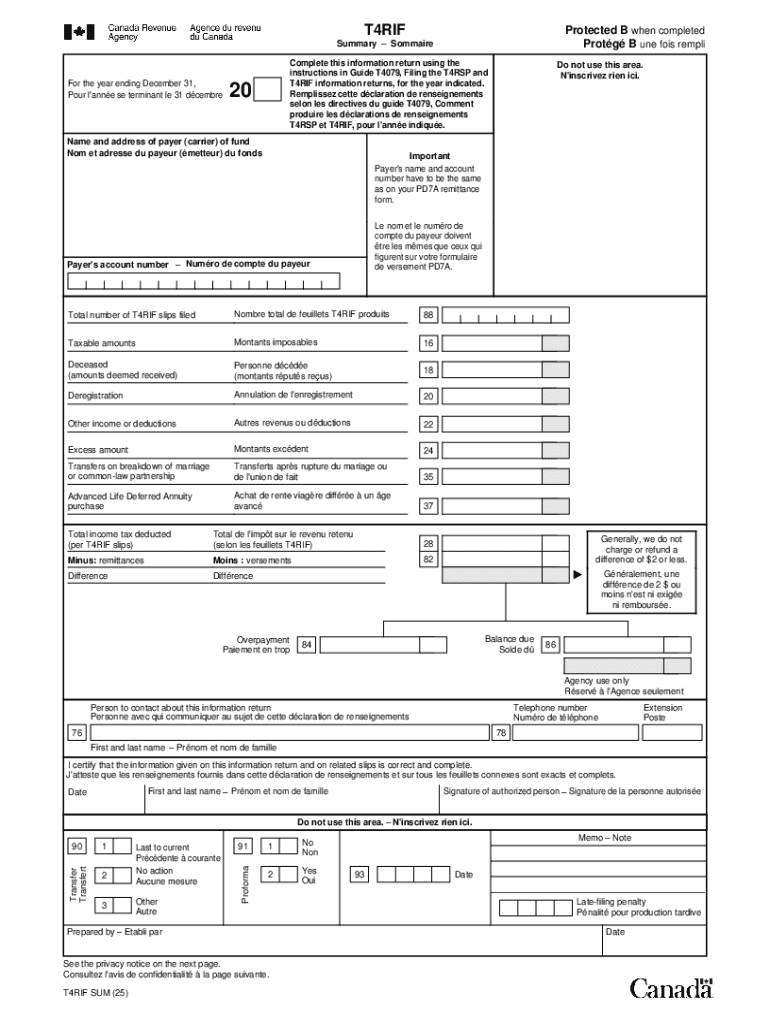
T4RIF Information Return
Use a T4RIF Information Return template to make your document workflow more streamlined.
What T4RIF Information Return does
T4RIF Information Return is a named information-return document used to collect and preserve the details required by its issuing or requesting authority. The supplied source material does not identify an issuing agency, filing threshold, tax year, or statutory deadline, so those details should be confirmed from the form instructions before completion. In signNow, a sender uploads the return, reviews automatically detected fillable fields, assigns each field to the correct participant, sends it for completion or signature, and retains the finished document with its audit trail.
Who works with T4RIF Information Return
Financial services
Financial-services teams can upload T4RIF Information Return, assign payer or payee fields, request completion, and preserve the signed record for internal review. They should verify the form’s issuing instructions, reporting purpose, and required information before relying on the completed document.
Tax and accounting
Tax and accounting practices can use a controlled signNow template for recurring T4RIF Information Return workflows, route fields to clients or authorized representatives, and store the completed return with its audit trail. The responsible professional must confirm current authority instructions separately.
How the signNow workflow works
The signNow process keeps T4RIF Information Return preparation, participant assignment, signing, and record preservation in one controlled sequence.
Upload: Upload the T4RIF Information Return source document. Review: Review detected fields and correct their placement. Assign: Assign fields to each responsible participant. Complete: Send, complete, and preserve the audit trail.
Complete T4RIF Information Return online
Follow the document from upload through field review, signer assignment, completion, and audit-trail preservation in signNow.
Upload:
Upload the source return. Check fields:
Review detected fields and labels. Assign roles:
Assign each field to its participant. Send:
Send the return through signNow. Archive:
Complete, download, and archive the record.
 Best ROI. Our customers achieve an average 7x ROI within the first six months.
 Scales with your use cases. From SMBs to mid-market, airSlate SignNow delivers results for businesses of all sizes.
 Intuitive UI and API. Sign and send documents from your apps in minutes.
Key features for this information return
signNow combines document preparation, assigned fields, electronic signing, audit evidence, mobile access, and integrations for T4RIF Information Return workflows.
Field detection
Upload the source document, review automatically detected fields, and correct placement before sending, reducing manual preparation errors in a repeatable T4RIF Information Return workflow.
Role assignment
Assign every field to the appropriate participant and configure required completion, helping distinguish payer, recipient, reviewer, or authorized representative responsibilities before submission.
Remote signing
Send the return for electronic completion and signature through signNow, allowing recipients to review the document remotely rather than coordinating paper exchanges.
Audit trail
Capture signer actions, timestamps, and document history in an audit trail that travels with the completed return for later internal review.
Mobile access
Use signNow mobile apps on iOS and Android to review or complete assigned returns when desktop access is unavailable.
System connections
Connect completed records with systems such as Google Drive, Box, Salesforce, Microsoft 365, or NetSuite when the organization’s plan and controls support the integration.



Platform requirements for T4RIF Information Return
Use an up-to-date version of Chrome, Firefox, Safari, or Edge on Windows or macOS. signNow also provides mobile apps for iOS and Android, allowing participants to review and complete assigned documents from supported mobile devices.
Supported browsers Chrome, Firefox, Safari, Edge Operating systems Windows, macOS, iOS, Android Mobile access signNow mobile apps
Organizations should manage access through approved devices and identity controls appropriate to the return’s information. Teams using integrations should confirm API, SSO, and repository requirements with their signNow plan and internal security administrators before deployment.
Security controls for T4RIF Information Return
Data at rest:
Data in transit:
Security reporting:
Information security:
Signer verification:
Mobile verification:
Best practices for completing T4RIF Information Return
Use a controlled upload, accurate signer assignment, and complete records review before treating T4RIF Information Return as finished.
Confirm the form before sending
Mark required information clearly
Verify signer routing carefully
Preserve the completed record
Risks when the return is mishandled
Missing required data
Unverified signer identity
Insufficient audit evidence
Unconfirmed authority requirements
Challenges to address before submission
Personal or financial information can be exposed when a completed T4RIF Information Return is emailed broadly or stored without role-based access controls. A signer may complete fields without reviewing the authority’s instructions, leaving the return electronically complete but substantively inaccurate. Using an unapproved template or outdated source document can place incorrect field labels, reporting details, or signature requirements into the workflow. Deleting the return without preserving its audit trail can weaken the organization’s ability to show who completed it and when.
Key performance indicators that demonstrate SignNow's proven track record.
T4RIF Information Return troubleshooting
Resolve field, signer, legal, plan, and retention questions before treating T4RIF Information Return as complete.
Upload the original T4RIF Information Return as a readable document, then inspect every field signNow detects. If fields are missing or misplaced, add or reposition them manually before assigning recipients and sending the return.
Use signNow’s required-field controls and review the source instructions before sending. signNow can enforce completion of configured fields, but it does not determine whether the information entered satisfies the issuing authority’s substantive requirements.
The available materials do not identify whether this return requires a particular signature method. Confirm the governing instructions first; signNow supports electronic signing under ESIGN and UETA when the transaction meets applicable legal requirements.
Add signer email addresses carefully, assign fields to the correct participants, and use signing order when sequence matters. A completed audit trail records electronic actions, but it cannot correct a return routed to the wrong person.
Business includes templates, audit trails, and mobile apps. Business Premium adds bulk send, kiosk mode, request payments, and quick invite links; choose the plan based on the number and method of returns your team processes.
Download the completed return and audit trail after all assigned fields and signatures are finished. Because no T4RIF-specific retention period is provided here, apply the authority’s instructions and your organization’s documented records policy.
BE READY TO GET MORE
Get this form now!

If you believe that this page should be taken down, please follow our DMCA take-down process.