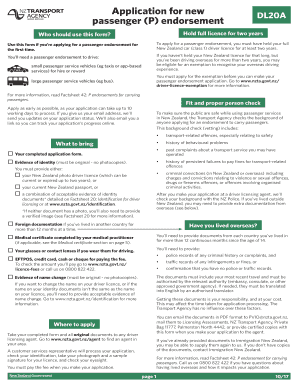
New Zealand Passenger Endorsement Application Form
Use a New Zealand Passenger Endorsement Application template to make your document workflow more streamlined.
About this passenger endorsement form
The New Zealand Passenger Endorsement Application Form is a document used to collect and approve information for a passenger-related endorsement request. In a U.S. business workflow, an authorized sender can upload the form to signNow, place fields over the applicant’s actual entries, and route it for review and signature. signNow records signer actions, timestamps, and document history in an audit trail. The form’s underlying New Zealand requirements remain controlling; ESIGN and applicable state electronic-transactions law address the signature method, not the eligibility decision or government approval.
Business types using this application
The form is most useful where passenger endorsement information must move between applicants, operators, reviewers, and authorized signers.
A transportation operator can prepare passenger endorsement information, send the application to the responsible signer, and retain the completed document with its audit trail. A compliance coordinator can manage repeated application packets, check required fields before dispatch, and provide authorized reviewers with a reproducible signed record. An enterprise mobility team can connect application intake with Salesforce or NetSuite, assign signing responsibilities, and centralize completed records through controlled administrative workflows.
These tasks are executed by both individual contributors and centralized administrators depending on organizational policy and required controls.
How the application workflow works
The New Zealand Passenger Endorsement Application Form moves from document preparation to signer review, completion, and controlled record storage.
Upload: Upload the application form Add fields: Place fields for applicants Send: Send to designated signers Archive: Store the signed record
 Best ROI. Our customers achieve an average 7x ROI within the first six months.
 Scales with your use cases. From SMBs to mid-market, airSlate SignNow delivers results for businesses of all sizes.
 Intuitive UI and API. Sign and send documents from your apps in minutes.
Complete the application in signNow
Use this sequence to prepare the New Zealand Passenger Endorsement Application Form for review and electronic signature.
Upload the original application file.:
Upload form Review auto-detected fields and add missing ones.:
Detect fields Enter the authorized signer’s email address.:
Assign signer Send for signature, then retain the completed record.:
Send and store
Choose a suitable signing method
- Use the signNow web app when preparing the New Zealand Passenger Endorsement Application Form, placing required fields, checking applicant details, and sending the completed packet to designated signers.
- Use the signNow mobile app when applicants or authorized staff need to review, complete, and sign the New Zealand Passenger Endorsement Application Form from an iOS or Android device.
- Use kiosk mode for supervised, in-person completion when staff manage the applicant’s device and need a controlled signing station for the New Zealand Passenger Endorsement Application Form.
- Use a shareable signing link when distributing the New Zealand Passenger Endorsement Application Form through an approved channel, while preserving signer access and the resulting audit trail.
Protect signer identity and records
PKI support:
X.509 certificates:
Two-factor authentication:
SMS OTP:
ID verification:
Signing evidence:



Application processing stages
Processing depends on document readiness, signer access, and the organization’s review process; the form itself does not establish a universal turnaround period.
Document preparation
Delivery to signers
Signer turnaround
Completion and archival
Check document exclusions first
Notarization rules
Wills excluded
Family law
Real-estate deeds
Troubleshoot form signing issues
These answers address field detection, signer access, authentication, legal evidence, excluded documents, and signNow plan limits for this application workflow.
Upload the original New Zealand Passenger Endorsement Application Form again and confirm its pages are readable. signNow can place fields after upload, but a damaged or image-only file may require manual field placement before sending.
Review the recipient email address and resend the invitation from signNow. The Business plan includes templates and audit trails; the signer can usually open the invitation without creating a signNow account.
Use signNow SMS OTP or another available authentication control when the application contains sensitive identity information. Authentication strength should match organizational policy and the signer’s risk profile.
ESIGN and UETA recognize electronic signatures when intent, consent, attribution, and record retention are established. Preserve the completed form and signNow audit trail so the transaction can be reproduced.
Do not use this workflow for wills, codicils, testamentary trusts, court orders, or official court filings. The ESIGN Act excludes these categories, and applicable state law may impose additional requirements.
The Business plan is listed at $8 per user per month with annual billing and includes 100 signature invites per user per year. Business Premium adds bulk send; verify plan limits before scaling.
Key performance indicators that demonstrate SignNow's proven track record.
BE READY TO GET MORE
Get this form now!

If you believe that this page should be taken down, please follow our DMCA take-down process.