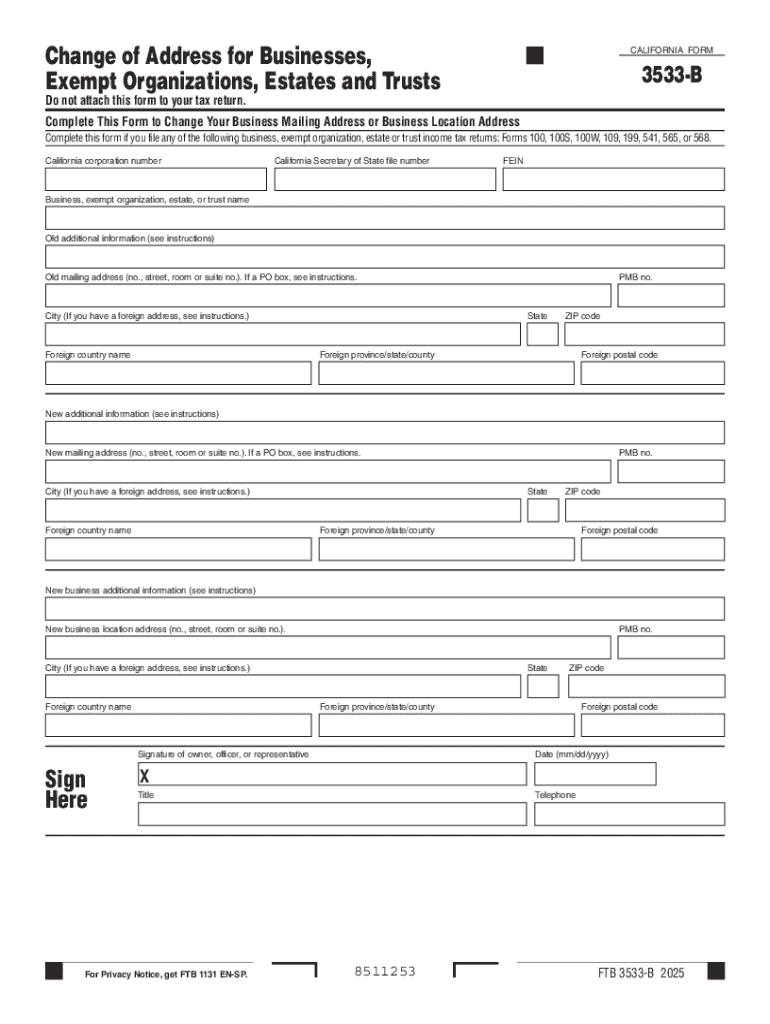
California Form 3533 B
Use a California Form 3533 B template to make your document workflow more streamlined.
What California Form 3533 B does
California Form 3533 B is a California form that should be completed from the instructions and transaction facts applicable to the filer; its exact filing purpose, fields, deadline, and submission method must be confirmed against the current official form. signNow can upload the document, detect fillable fields, route it to designated recipients, capture electronic signatures where legally permitted, and retain the signed PDF with an audit trail. Electronic processing does not replace a required government filing, notarization, or agency-specific submission rule.
Key features for California Form 3533 B
signNow combines form preparation, recipient routing, electronic signing, evidence capture, and controlled storage for California Form 3533 B workflows.
Form preparation
Upload the current California Form 3533 B and let signNow identify fillable areas before you assign recipients or add signature fields.
Recipient routing
Route the form to named recipients by email, keeping signer assignments aligned with the roles and instructions shown on California Form 3533 B.
Electronic signing
Capture electronic signatures with documented intent and a completion record when ESIGN and applicable California law permit electronic execution.
Audit evidence
Preserve timestamps, actions, delivery details, and the signed PDF so reviewers can evaluate how California Form 3533 B was completed.
Signer verification
Apply authentication appropriate to the information in the form, including SMS OTP or stronger verification when identity risk warrants it.
Workflow continuity
Connect signNow with storage or business systems to reduce manual copying while retaining the original form and completion evidence.
Recommended California Form 3533 B setup
Use controlled authentication, explicit signing intent, and a retention policy tied to the transaction represented by the form.
| Setting | Recommendation |
|---|---|
| Authentication method | Email link with SMS OTP |
| Signature type | Electronic signature with intent |
| Audit trail | Certificate of completion and event log |
| Document retention | Apply the underlying transaction rule |
| Encryption | TLS 1.2/1.3 and AES-256 protection |
Complete California Form 3533 B in signNow
Use this workflow to prepare the form, collect authorized signatures, and preserve evidence without changing the form’s official filing requirements.
Upload form:
Upload the current California Form 3533 B. Detect fields:
Let signNow detect fillable fields. Assign recipients:
Review fields and assign recipients. Send form:
Send the form for signature. Archive record:
Store the signed PDF and audit trail.
 Best ROI. Our customers achieve an average 7x ROI within the first six months.
 Scales with your use cases. From SMBs to mid-market, airSlate SignNow delivers results for businesses of all sizes.
 Intuitive UI and API. Sign and send documents from your apps in minutes.
Inside the California Form 3533 B audit trail
signNow records the signing events that connect each California Form 3533 B signature to a person, time, document, and completed record.
Authenticate signer:
Capture timestamps:
Record document hash:
Seal the record:
Track document events:
Retrieve audit evidence:
Signer authentication options
Digital certificates:
Certificate format:
Signer verification:
Phone verification:
Identity proofing:
Session control:



Record-keeping practices for California Form 3533 B
Keep the completed form, signer evidence, and retention decision together so the record remains understandable and reviewable.
Export the complete signing record
Match retention to the transaction
Control access to sensitive information
Preserve an immutable archive
Legal standing of California Form 3533 B
California Form 3533 B may be completed and signed electronically when the transaction permits electronic records, because ESIGN, 15 U.S.C. chapter 96, and applicable state electronic-transactions law recognize qualifying electronic signatures. Intent, consent, signer attribution, and reproducible records support evidence. Wills, codicils, testamentary trusts, court orders, and certain family-law filings remain excluded under ESIGN.

Challenges when completing California Form 3533 B
Using an outdated California Form 3533 B version can place information in the wrong field or omit a required instruction. Sending the form before verifying recipient identity can create attribution questions when multiple people share an email address. Saving only the signed PDF omits the audit trail, making it harder to demonstrate consent, timing, and document history. Treating an electronic signature as a substitute for a required notarization or official filing can leave the transaction incomplete.
Rules that may limit electronic signing
Separate notarization required
ESIGN exclusion
Agency rules control
Electronic exclusion may apply
Troubleshoot California Form 3533 B workflows
Resolve field, signer, evidence, plan, and security questions before treating the completed California Form 3533 B as final.
Upload the current California Form 3533 B as a PDF, then review signNow’s detected fields manually. Auto-detection can identify fillable areas, but the sender remains responsible for confirming labels, required fields, recipient assignments, and the official form’s instructions before sending.
A signNow electronic signature can support California Form 3533 B when the transaction permits electronic records and the signer demonstrates intent and consent. ESIGN, 15 U.S.C. chapter 96, and applicable state law govern validity; confirm any California agency submission rule separately.
Use signNow’s audit trail and certificate of completion to preserve signer identity, timestamps, actions, and delivery evidence. The Business plan includes audit trails; retain the completed PDF and exported audit evidence together under your applicable records policy.
If a signer cannot open the request, verify the email address, resend the invitation, or create a controlled signing link. For sensitive California Form 3533 B data, confirm recipient identity before using a shareable link and avoid forwarding it publicly.
Business is listed at $8 per user per month with annual billing and includes 100 signature invites per user per year. Business Premium is $15 annually and adds bulk send; verify available capacity before routing repeated California Form 3533 B requests.
signNow encrypts data in transit with TLS 1.2/1.3 and at rest with AES-256. Its compliance materials list SOC 2 Type II and ISO 27001, while HIPAA workflows require a business associate agreement when protected health information is involved.
Key performance indicators that demonstrate SignNow's proven track record.
BE READY TO GET MORE
Get this form now!

If you believe that this page should be taken down, please follow our DMCA take-down process.