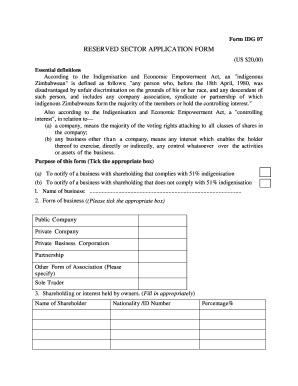
Reserved Sector Application Form
Use a Reserved Sector Application Form template to make your document workflow more streamlined.
What is the Reserved Sector Application Form
The Reserved Sector Application Form is a document whose official issuer, filing purpose, required fields, and deadline are not identified in the supplied source. In signNow, a user can upload the file, review auto-detected fillable fields, assign recipients, send it for electronic signature, and retain the completed record with an audit trail. ESIGN and UETA generally recognize qualifying electronic signatures, but they do not replace an agency’s or state law’s specific requirements. Confirm the form’s authority and submission rules before relying on an electronic workflow.
Who uses this application form
Legal services
A legal services team can upload the Reserved Sector Application Form, map signer and date fields, route it to authorized parties, and preserve the completed PDF with its audit trail. Because no issuing agency or official filing rule is supplied for this form, the team should confirm the recipient and governing state requirements before use.
Business operations
An operations or administrative team can prepare the Reserved Sector Application Form for contracts, NDAs, HR forms, invoices, or consent workflows when the form owner confirms those document types are appropriate. signNow supports templates, mobile signing, and audit trails, but the organization remains responsible for validating the form’s authority and required information.
How the application form works
The signNow workflow moves this Reserved Sector Application Form from upload to field review, signer routing, completion, and auditable storage.
Upload: Upload the form file Check fields: Review auto-detected fields Set routing: Assign signers and routing Archive: Store the completed record
Quick steps for this application form
Prepare the Reserved Sector Application Form in signNow by checking detected fields, assigning recipients, and preserving the completed document.
Upload form:
Upload the Reserved Sector Application Form file. Detect fields:
Let signNow detect fillable fields. Assign signers:
Correct fields and assign recipients. Complete record:
Send, sign, and download the completed record.
 Best ROI. Our customers achieve an average 7x ROI within the first six months.
 Scales with your use cases. From SMBs to mid-market, airSlate SignNow delivers results for businesses of all sizes.
 Intuitive UI and API. Sign and send documents from your apps in minutes.
Platform requirements for signing
Complete the Reserved Sector Application Form in Chrome, Firefox, Safari, or Edge on Windows or macOS. signNow also provides mobile apps for iOS and Android, while secure connections use TLS 1.2 or TLS 1.3.
Browser support Chrome, Firefox, Safari, Edge Operating systems Windows, macOS, iOS, Android Secure connection TLS 1.2 or TLS 1.3
Organizations handling this form should manage access through approved devices and user accounts. Enterprise deployments may also require API access, SSO provisioning, managed-device controls, or certificate configuration. Confirm those requirements with the administrator responsible for the form before enabling production signing.
Challenges when preparing this form
The form has no identified issuing agency, so recipients may dispute which fields, signatures, or supporting documents are required. Auto-detected fields can miss handwritten labels, checkboxes, or signature areas in scanned Reserved Sector Application Form files. Routing the form to an unauthorized signer can weaken attribution and delay acceptance by the receiving organization. Keeping only the signed PDF without its audit trail can reduce evidence of delivery, intent, timestamps, and signer actions.
Recommended workflow setup
Configure the Reserved Sector Application Form around verified signer identity, controlled access, audit evidence, and the retention rule supplied by its owner.
| Setting | Recommendation |
|---|---|
| Authentication method | Email verification with SMS authentication |
| Signature type | Electronic signature with signer intent |
| Audit trail | Retain completion certificate and action history |
| Document retention | Follow the form owner’s written policy |
| Encryption and user provisioning | Use TLS, AES-256, and managed access |
What the signNow audit trail records
The audit trail documents technical events surrounding the Reserved Sector Application Form without replacing the form owner’s legal or filing requirements.
Authenticate signer:
Timestamp actions:
Hash document:
Seal record:
Log activity:
Export audit trail:
Features for this application form
signNow connects field preparation, signer routing, mobile completion, and record evidence for organizations processing the Reserved Sector Application Form.
Field detection
Upload the Reserved Sector Application Form and review signNow’s detected fields before assigning recipients, reducing omissions in scanned or mixed-format files.
Templates
Reusable templates can preserve the approved field layout, signer order, and instructions when the same Reserved Sector Application Form recurs.
Signer routing
Email routing and signer assignments make responsibility visible before the application form reaches its intended recipient.
Mobile signing
Mobile apps allow authorized users to review and sign the Reserved Sector Application Form from supported iOS and Android devices.
Audit trail
Audit trails preserve delivery, signer actions, timestamps, and document history for later review of the completed application form.
Data protection
Encryption and compliance controls help protect records, while the applicable form owner remains responsible for legal and retention decisions.
Security controls for form records
Transport encryption:
Stored encryption:
Service assurance:
Security certification:
Health data controls:
Electronic signatures:
Troubleshooting Reserved Sector Application Form
Resolve field, signing, plan, and compliance questions before sending the Reserved Sector Application Form through signNow.
Upload the Reserved Sector Application Form to signNow, then review detected fields and add missing signer, date, or initials fields manually. Business includes templates and audit trails; Business Premium adds bulk send. ESIGN and UETA recognize electronic signatures when intent, consent, attribution, and record retention requirements are met.
A signing link does not identify the form’s legal purpose by itself. Confirm the Reserved Sector Application Form’s recipient, required disclosures, and signer authority before sharing. signNow’s quick invite links are available with Business Premium, while email delivery and audit trails support attribution.
Use signNow’s audit trail to preserve timestamps, signer actions, delivery events, and the completed record. ESIGN and UETA address electronic-signature validity, but they do not determine whether this unnamed form requires additional agency, state, or industry approvals.
Business provides legally binding eSignatures, templates, audit trails, and mobile apps at $8 per user per month when billed annually. Subscription plans include 100 signature invites per user each year; confirm overage terms before routing high-volume Reserved Sector Application Form packets.
Business Premium costs $15 per user per month annually and adds bulk send, kiosk mode, request payments, and quick invite links. Use bulk send only when each Reserved Sector Application Form packet has the same field structure and recipient logic.
signNow is HIPAA compliant when a business associate agreement is required and configured appropriately. Do not assume this form contains protected health information; identify the data first, then select safeguards, access controls, and retention rules appropriate to the actual workflow.
Key performance indicators that demonstrate SignNow's proven track record.
BE READY TO GET MORE
Get this form now!

If you believe that this page should be taken down, please follow our DMCA take-down process.