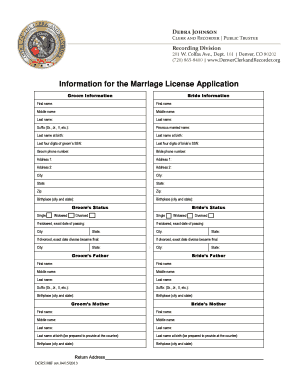
Marriage License Application Form
Use a Marriage License Application template to make your document workflow more streamlined.
What a marriage license application does
A Marriage License Application Form records the information a county or state licensing office needs before issuing authorization to marry. Applicants usually provide legal names, birth information, addresses, identification details, prior-marriage history, and signatures, but required fields and procedures vary by jurisdiction. The completed form is submitted according to local instructions, often with identification, payment, and any required supporting records. signNow can help prepare and collect signatures electronically, but it does not replace a clerk’s filing rules, identity checks, waiting periods, fees, or issuance decision.
Who uses this marriage license form
Applicants
Couples complete identifying information, prior-marriage details, residence information, and requested ceremony details before submitting to the appropriate county or state authority.
Issuing offices
County clerks and authorized officiants review submitted applications, confirm required fields, and apply jurisdiction-specific filing or issuance procedures.
Marriage license application challenges
Applicants may enter names, birth dates, or prior-marriage information differently from identity documents, creating review delays or correction requests. County requirements vary, so an otherwise complete application may omit a required identification document, fee, waiting-period acknowledgment, or appointment. Submitting an application to the wrong county or using an outdated local version can require resubmission before a ceremony. Unreadable scans, missing signatures, or inconsistent personal information can prevent the clerk from accepting the application.
Legal standing and filing limits
A completed Marriage License Application Form documents the applicants’ information and intent for review by the issuing authority. Under ESIGN and UETA, electronic records and signatures can generally support interstate and intrastate transactions when consent, attribution, and record retention requirements are met. State and county rules still control whether this application may be signed electronically, notarized, or submitted online.

 Best ROI. Our customers achieve an average 7x ROI within the first six months.
 Scales with your use cases. From SMBs to mid-market, airSlate SignNow delivers results for businesses of all sizes.
 Intuitive UI and API. Sign and send documents from your apps in minutes.
How to prepare the application
Follow the local clerk’s instructions first, then use signNow to prepare, route, sign, and retain the application record.
Upload form:
Upload the current application file. Detect fields:
Let signNow detect fillable fields. Assign signers:
Add both applicants as signers. Check entries:
Review names and required information. Send securely:
Send only through an approved process. Store records:
Download the completed record and audit trail.
Ways to complete and sign the application
- Use the signNow web app to upload the Marriage License Application Form, review detected fields, and prepare the application on a desktop browser.
- Use the signNow mobile app when applicants or authorized staff need to review and sign the marriage license application from a phone.
- Use kiosk mode when both applicants complete the form at a controlled counter or service location using the same device.
- Generate a shareable signing link when a county-approved workflow permits remote collection before the completed application is delivered as instructed.
Recommended application workflow setup
Configure the Marriage License Application Form around applicant identity, county acceptance rules, and a reproducible signing record.
| Setting | Recommendation |
|---|---|
| Authentication method | Email link with SMS OTP |
| Signature type | Typed or drawn e-signature |
| Audit trail | Export with signed PDF |
| Document retention | Follow county records schedule |
| Encryption | TLS 1.2/1.3 and AES-256 |
Signer authentication options
Signer authentication:
Two-factor authentication:
Identity verification:
Digital certificates:
Certificate standard:
Audit evidence:
Platform requirements for signing
Use signNow through Chrome, Firefox, Safari, or Edge on Windows or macOS. Applicants can also review and sign through signNow mobile apps on iOS and Android, subject to the county’s approved process.
Browsers Chrome, Firefox, Safari, Edge Desktop systems Windows and macOS Mobile systems iOS and Android
Organizations handling marriage license applications should use managed accounts, role-based access, and current browser security controls. Confirm that every signer can open, review, and reproduce the completed PDF before submitting it to the issuing county or state authority.
Best practices for completing the form
Accuracy matters because the issuing authority, not the signing platform, decides whether a marriage license application is acceptable.
Confirm county requirements before completion
Match applicant details to identification
Check electronic-signature acceptance first
Preserve the accepted application record
Rules that can affect acceptance
Rejected submission
Clerk requests correction
Resubmission required
Electronic record may not suffice
Application returned
Marriage license application troubleshooting
Resolve signing problems in signNow, but verify every filing, identity, timing, and submission requirement with the issuing county or state authority.
A county clerk’s acceptance decision depends on local law, not the signNow Business plan. Confirm whether electronic signatures and electronic submission are permitted, and retain any required paper copy, appointment, identification, or notarization evidence.
The signNow Business plan includes templates and audit trails at $8/user/month with annual billing. Business Premium is $15/user/month annually and adds bulk send, kiosk mode, and quick invite links; choose features based on the approved workflow.
A completed signNow record does not itself establish that applicants satisfied a state waiting period or ceremony deadline. Check the issuing clerk’s instructions because those dates vary by jurisdiction and are not determined by signNow.
If an applicant cannot access the form, verify the email address, resend the invitation, or provide an approved signing link. For stronger attribution, enable SMS OTP or another available authentication method before signature collection.
ESIGN and UETA generally recognize electronic records and signatures when intent, consent, attribution, and reproducible retention are established. They do not override exceptions or a county rule requiring in-person signing, notarization, or paper submission.
Signers can review the completed document and audit trail, but signNow cannot correct a legal-name discrepancy or determine which supporting documents a clerk requires. Void or correct the workflow and follow the county’s amendment instructions.
Key performance indicators that demonstrate SignNow's proven track record.
BE READY TO GET MORE
Get this form now!

If you believe that this page should be taken down, please follow our DMCA take-down process.