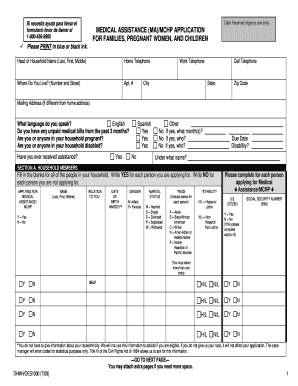
Medical Assistance Application Form
Use a Medical Assistance Application Form template to make your document workflow more streamlined.
What the medical assistance application does
A Medical Assistance Application Form collects the information an agency uses to evaluate eligibility for health-related assistance. Applicants generally provide identity, household, income, residency, insurance, and healthcare details, then authorize review by signing the form. The exact fields and submission rules depend on the state or program issuing the application. signNow can prepare the supplied document, detect fillable fields, route it for electronic signatures where permitted, and retain the completed form with an audit trail. Confirm agency-specific filing and consent requirements before submission.
Who uses the medical assistance application
Healthcare and benefits teams
State Medicaid offices, county eligibility teams, hospitals, clinics, and community health organizations may use the Medical Assistance Application Form to collect applicant identity, household, income, insurance, and healthcare information. Caseworkers can route signature fields to applicants or authorized representatives, then preserve the completed record for review.
Applicants and representatives
Applicants and authorized representatives use the form to request or renew medical assistance. They may complete assigned fields, review consent language, sign electronically where permitted, and receive a copy. The issuing program still controls eligibility decisions, required attachments, deadlines, and final submission.
Key features for medical assistance applications
signNow connects document preparation, applicant signing, consent capture, and auditable storage for Medical Assistance Application Form workflows.
Field detection
Upload the Medical Assistance Application Form and use detected fillable fields to prepare applicant information without rebuilding the document.
Guided completion
Place signature, initials, date, and consent fields so applicants complete the medical assistance application in a defined sequence.
Secure sending
Send the prepared application to applicants or authorized representatives by email, then track pending and completed signatures.
Audit trail
Capture timestamps, signer actions, and document history for a record of how the medical assistance application was completed.
Record storage
Store the completed application and its audit record together, supporting controlled retrieval during eligibility or compliance review.
Reusable templates
Use templates for recurring medical assistance applications while preserving consistent fields and signer routing across cases.
How to complete the application online
Prepare the Medical Assistance Application Form in signNow, route it to the required people, and preserve the completed record.
Upload form:
Upload the Medical Assistance Application Form PDF. Check fields:
Review auto-detected fields and add missing fields. Assign roles:
Assign applicant and representative signing roles. Send request:
Send the completed request through signNow. Archive record:
Store the signed form with its audit trail.



 Best ROI. Our customers achieve an average 7x ROI within the first six months.
 Scales with your use cases. From SMBs to mid-market, airSlate SignNow delivers results for businesses of all sizes.
 Intuitive UI and API. Sign and send documents from your apps in minutes.
Security for medical assistance applications
Data encryption:
Secure transmission:
Healthcare compliance:
Security certification:
ISO certification:
Privacy standards:
Privacy challenges in medical assistance applications
Medical assistance applications may expose diagnoses, income details, or household information when sent without controlled access. Applicants may sign before reviewing electronic-record consent, creating uncertainty about whether required consumer disclosures were understood. Shared inboxes can give unauthorized staff access to completed applications containing protected health information. Incomplete household, insurance, or eligibility fields can delay agency review and require repeated applicant contact.
Recommended application workflow setup
Configure the Medical Assistance Application Form around applicant identity, informed consent, protected information, and an auditable record lifecycle.
| Setting | Recommendation |
|---|---|
| Authentication method | Email verification with SMS OTP |
| Signature type | Typed or drawn electronic signature |
| Audit trail | Enable timestamps and action history |
| Document retention | Follow program and HIPAA records policy |
| Encryption | AES-256 at rest with TLS 1.2/1.3 |
Risks of incomplete medical assistance forms
Electronic consent
Signer identity
Document integrity
Eligibility delay
Retention periods for related records
Keep the signed application according to the issuing program, state policy, and any applicable healthcare recordkeeping rule.
Six years for HIPAA records
Three years for tax records
Six years for major understatement
Three years for payroll records
Five years for injury records
Recordkeeping practices for applications
Preserve the application, consent evidence, and audit history according to the program’s documented retention and privacy requirements.
Confirm the applicable retention rule
Export the audit trail with records
Archive applicant data securely
Review templates before reuse
Platform requirements for applicants
Applicants can open and sign the Medical Assistance Application Form through Chrome, Firefox, Safari, or Edge on Windows and macOS computers, or through signNow mobile apps on iOS and Android. Secure connections use TLS 1.2/1.3.
Browser support Chrome, Firefox, Safari, and Edge Operating systems Windows, macOS, iOS, and Android Secure connection TLS 1.2/1.3 connection required
Organizations handling health information should manage supported devices, restrict downloaded copies, and configure access through their internal security policy. API, SSO, certificate, and long-term validation requirements should be reviewed separately for regulated deployments and state agency submission rules.
Medical assistance application use cases
Healthcare teams use signed medical assistance applications to coordinate applicants, representatives, consent, and records across distributed care settings.
Healthcare intake
Healthcare organizations can route patient-facing applications to applicants and authorized representatives without requiring an office visit for every signature.
- HIPAA workflow requires a BAA.
- Audit trails preserve signing history.
A healthcare team can use signNow to prepare the Medical Assistance Application Form, collect signatures on desktop or mobile devices, and retain the signed record with its audit trail. The organization must still confirm program-specific submission rules, consent language, and the applicable privacy safeguards before sending the application to an agency.
Fertility care
Fertility Centers of Illinois is a healthcare customer whose director cited signNow’s API and responsive implementation experience.
- API supports connected workflows.
- Patient-facing forms remain accessible.
The customer example shows how a healthcare organization can connect signed medical documents to broader operational workflows. It does not establish a rule for any particular state assistance program, so administrators should map the Medical Assistance Application Form to the issuing agency’s required fields and submission channel.
Medical assistance application troubleshooting
Resolve field, consent, privacy, plan, and legal-eligibility questions before submitting a signed Medical Assistance Application Form.
Upload the original Medical Assistance Application Form as a readable PDF, then review signNow’s detected fields before sending. If fields are missing, add text, date, checkbox, consent, and signature fields manually and confirm each field belongs to the correct signer.
Use signNow’s audit trail to document intent, signer attribution, timestamps, and actions. For consumer-facing healthcare records, provide the ESIGN disclosure, explain the right to paper records, confirm electronic access, and maintain withdrawal procedures under 15 U.S.C. §7001(c).
signNow states that HIPAA compliance is available when a business associate agreement is required. Confirm that the applicable plan and BAA cover the workflow, restrict access to authorized personnel, and follow the healthcare organization’s privacy and security policies.
Business is listed at $8/user/month when billed annually and includes legally binding signatures, templates, mobile apps, and audit trails. Business Premium is $15/user/month annually and adds bulk send, kiosk mode, payments, and quick invite links.
For a single application, use email delivery or a shareable signing link after verifying the recipient. For multiple applicants, Business Premium includes bulk send. Review every generated copy before distribution because applicant data may differ.
ESIGN and UETA generally recognize electronic signatures when intent, consent, attribution, and record retention are demonstrated. They do not cover wills, court orders, family-law decrees, or other statutory exclusions, so confirm the issuing agency’s signature rule before relying on e-signing.
Key performance indicators that demonstrate SignNow's proven track record.
BE READY TO GET MORE
Get this form now!

If you believe that this page should be taken down, please follow our DMCA take-down process.