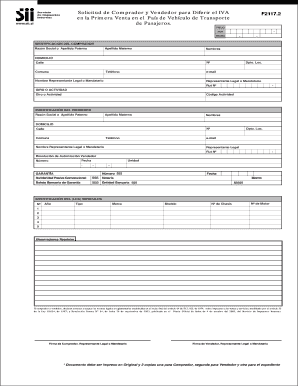
Solicitud DE Comprador Y Vendedor Para Diferir El Iva F2117 2 Form
Use a Solicitud De Comprador Y Vendedor Para Diferir El IVA F2117 2 template to make your document workflow more streamlined.
What the F2117 2 form does
The Solicitud DE Comprador Y Vendedor Para Diferir El Iva F2117 2 Form is a buyer-and-seller request identified by the F2117 2 designation; the supplied form name does not establish a U.S. issuing agency, filing deadline, tax threshold, or substantive eligibility rule. In signNow, the document is uploaded, its buyer and seller fields are reviewed and assigned, and signature requests are sent to the parties. The completed record can then be downloaded with its audit trail. Confirm the form’s governing jurisdiction and instructions before relying on it.
Who uses the F2117 2 form
Buyer
A buyer uses the form to review transaction details, complete assigned fields, and provide the required electronic signature before the record is finalized.
Seller
A seller uses the form to confirm seller information, review the buyer’s entries, sign assigned fields, and retain the completed transaction record.
How the F2117 2 form works
The F2117 2 workflow moves from document preparation to verified signatures and preserved records without changing the form’s underlying information.
Upload form: Upload the F2117 2 form template. Add fields: Add buyer and seller fields. Send requests: Send signature requests in order. Store record: Store the signed record securely.
Complete the F2117 2 form online
Prepare the buyer and seller information, route the form to each signer, and preserve the completed record with its audit trail.
Upload the form:
Upload the F2117 2 form PDF. Check fields:
Review detected fields and add missing buyer or seller fields. Assign parties:
Assign each field to the correct party. Send for signing:
Send the signature request and monitor completion. Preserve records:
Download the signed copy and audit trail.
Security controls for the F2117 2 form
Web app:
Mobile app:
Kiosk mode:
Signing link:
SMS verification:
Audit trail:
 Best ROI. Our customers achieve an average 7x ROI within the first six months.
 Scales with your use cases. From SMBs to mid-market, airSlate SignNow delivers results for businesses of all sizes.
 Intuitive UI and API. Sign and send documents from your apps in minutes.
Legal standing of the F2117 2 form
For a U.S. business transaction, an electronically signed F2117 2 form can be evidence when the parties demonstrate intent, consent, attribution, and reliable record retention under ESIGN and applicable state law. Wills, certain court orders, and family-law decrees remain excluded from ESIGN’s electronic-record framework.

Recommended F2117 2 workflow setup
Use controlled signer access, an attributable electronic signature, and preserved records for each completed F2117 2 form.
| Setting | Recommendation |
|---|---|
| Authentication method | Email verification with SMS OTP |
| Signature type | Intent-based electronic signature |
| Audit trail | Retain completion certificate and action log |
| Document retention | Retain according to transaction policy |
| Encryption | TLS 1.2/1.3 and AES-256 protection |
Privacy challenges when completing the F2117 2 form
Sending the F2117 2 form to the wrong recipient can expose buyer or seller information outside the intended transaction. Leaving required buyer or seller fields unassigned can produce an incomplete form and delay final signature collection. Failing to capture electronic consent may weaken evidence that each party agreed to use an electronic record. Sharing completed forms through uncontrolled channels can expose personal transaction details after signing.
Platform requirements for the F2117 2 form
The F2117 2 form can be prepared through supported desktop browsers using TLS-secured access, while signNow mobile apps support signing on iOS and Android devices.
Browser support Chrome, Firefox, Safari, and Edge Desktop systems Windows and macOS desktop access Mobile systems iOS and Android mobile apps
Organizations should manage access through approved devices and user permissions. Teams requiring API access, SSO provisioning, or regulated signing configurations should confirm those capabilities against their signNow plan before deploying the F2117 2 workflow.



Audit trail steps for the F2117 2 form
The audit trail records what happened during signing, separate from the earlier work of uploading and assigning fields.
Authenticate signer:
Capture timestamps:
Protect integrity:
Seal record:
Retrieve evidence:
Export record:
Best practices for retaining F2117 2 records
Accurate field assignment, controlled access, and reliable record preservation help keep the completed F2117 2 form useful for later review.
Export the signed record
Set a documented retention period
Limit access to transaction data
Protect document version history
Key features for the F2117 2 form
signNow connects preparation, signer routing, electronic execution, and record preservation around the buyer-and-seller form workflow.
Field preparation
Upload the F2117 2 form and review detected fields before assigning buyer and seller information for signature.
Signer routing
Route designated fields to the buyer and seller so each party signs only the information assigned to them.
Flexible signing
Collect signatures through email requests, mobile apps, or controlled signing links without recreating the document.
Audit evidence
Capture timestamps, signer actions, and completion history in an audit trail connected to the signed form.
Reusable template
Use templates to preserve the approved F2117 2 layout and reduce repeated field-placement work.
Record preservation
Store or export the completed form for transaction records, subject to the applicable retention policy.
Key performance indicators that demonstrate SignNow's proven track record.
Troubleshooting the F2117 2 form workflow
These answers address field assignment, signer routing, plan capabilities, evidence preservation, privacy scope, and electronic-signature limits for this form.
Upload the PDF, then use signNow’s field detection and inspect every assigned buyer and seller field before sending. The Business plan includes templates and audit trails, helping preserve the completed F2117 2 record after both parties sign.
Check that each recipient’s email address is correct and that required fields are assigned to the right signer. signNow supports signature requests and audit trails; the sender should correct routing before the F2117 2 form is executed.
Business provides legally binding eSignatures, templates, audit trails, and mobile apps at $8/user/month with annual billing. Business Premium is $15/user/month annually and adds bulk send, kiosk mode, payments, and quick invite links.
Use signNow’s audit trail and completion certificate to preserve signer actions, timestamps, and document history. For U.S. transactions, electronic-signature enforceability also depends on intent, consent, attribution, and record reproduction under ESIGN and applicable state law.
HIPAA compliance is relevant only when the F2117 2 workflow contains protected health information. signNow lists HIPAA compliance with a BAA requirement; otherwise, apply the privacy and retention rules governing this transaction’s actual records.
If a party cannot sign electronically, do not treat the completed workflow as sufficient without checking the transaction’s governing requirements. ESIGN excludes wills, certain court filings, and family-law decrees; obtain professional advice for state-specific exceptions.
BE READY TO GET MORE
Get this form now!

If you believe that this page should be taken down, please follow our DMCA take-down process.