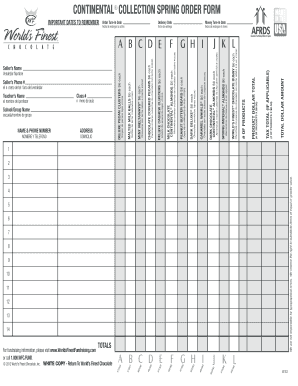
Continental Collection Spring Order Form
Use a CONTINENTAL COLLECTION SPRING ORDER FORM template to make your document workflow more streamlined.
What the Continental Collection Spring Order Form does
The Continental Collection Spring Order Form is a business document used to record a seasonal order between a customer and Continental Collection. Because no issuing agency, statutory filing deadline, or official field schedule is identified for this form, its practical purpose depends on the transaction. A sender can upload the document to signNow, add or confirm fillable fields, assign signer roles, send it for review and signature, and retain the completed copy with its audit trail. The parties should verify prices, quantities, delivery terms, and any required approvals before signing.
Legal standing of the signed order form
A completed Continental Collection Spring Order Form can support a U.S. business transaction when the parties demonstrate intent, consent, attribution, and reliable record retention. ESIGN, 15 U.S.C. ch. 96, and applicable state law, usually UETA or New York ESRA, generally recognize qualifying electronic records and signatures. Wills, certain court orders, and specified family-law records remain excluded.

How the order workflow works
The signNow workflow moves the Continental Collection Spring Order Form from document preparation through signature and controlled record storage.
Upload: Upload the order form Review: Confirm fillable fields Assign: Add the customer signer Finalize: Complete and archive
 Best ROI. Our customers achieve an average 7x ROI within the first six months.
 Scales with your use cases. From SMBs to mid-market, airSlate SignNow delivers results for businesses of all sizes.
 Intuitive UI and API. Sign and send documents from your apps in minutes.
Complete the order form in signNow
Prepare the Continental Collection Spring Order Form in signNow by checking transaction details before requesting an electronic signature.
Start the document:
Upload the order form Check every field:
Review detected fields Add the customer:
Assign the signer Deliver the order:
Send for signature Archive completion:
Store the final record
Choose a sending and signing method
- Use the signNow web app when preparing the Continental Collection Spring Order Form, checking fields, assigning roles, and sending the order from a desktop browser.
- Use the signNow mobile app when a salesperson or customer needs to review and sign the Continental Collection Spring Order Form from an iOS or Android device.
- Use kiosk mode when a staff member and customer complete the Continental Collection Spring Order Form together on one controlled device at a counter or showroom.
- Generate a shareable signing link when the same Continental Collection Spring Order Form must reach customers through an approved website, email, or message.
Recommended order-form configuration
Use a documented signing workflow that preserves the order, signer identity, and transaction history.
| Setting | Recommendation |
|---|---|
| Authentication method | Email verification with optional SMS OTP |
| Signature type | Electronic signature with signer intent |
| Audit trail | Capture timestamps, IP address, and actions |
| Document retention | Retain under the transaction’s governing policy |
| Encryption | TLS 1.2 or 1.3 in transit |
What the signNow audit trail records
The audit trail preserves evidence about who handled the Continental Collection Spring Order Form and how the signing event progressed.
Authenticate signer:
Capture timestamps:
Track document history:
Seal completion:
Log activity:
Retrieve evidence:
Security for signed order records
Data in transit:
Data at rest:
Independent controls:
Security certification:
Electronic signatures:
Transaction evidence:
Privacy and disclosure pitfalls
Including customer addresses, contact details, or payment information in the signed order can expose personal data to every recipient or repository user. Sending the form before recording electronic consent may weaken evidence that the customer agreed to receive and sign the order electronically. Assigning the wrong signer can leave the customer’s acceptance unattributed, especially when a purchasing employee signs for a business. Leaving completed orders accessible to every team member can disclose order values, delivery details, or customer information beyond the transaction team.
Questions about completing the order form
These answers address field review, signer identity, enforceability, audit evidence, and signNow plan limits for this order form.
Upload the original Continental Collection Spring Order Form as a clear PDF, then use signNow’s field detection and review each detected field before sending. Detection does not confirm that prices, quantities, addresses, or order terms are accurate.
The Business plan includes templates and audit trails, while Business Premium adds bulk send. If repeated seasonal orders require bulk delivery, select the plan that includes bulk send or send each order individually.
Use signNow’s signer authentication options, such as email verification or SMS OTP, when the order contains customer or payment-related information. Record consent and signer intent before accepting the completed form.
ESIGN and applicable state electronic-transactions law generally recognize the signed order when intent, consent, attribution, and reliable reproduction are established. Consumer-facing transactions may also require the ESIGN disclosure under 15 U.S.C. §7001(c).
If a customer reports that the signed file changed, compare the final PDF with the signNow audit trail and document history. Preserve the completed record and avoid editing the signed document outside the controlled workflow.
Paid signNow plans include 100 signature invites per user per year, with overage fees. The Site License uses a $1.50-per-signature-invite model. Confirm current plan terms before sending a high-volume order campaign.
Key performance indicators that demonstrate SignNow's proven track record.
BE READY TO GET MORE
Get this form now!

If you believe that this page should be taken down, please follow our DMCA take-down process.