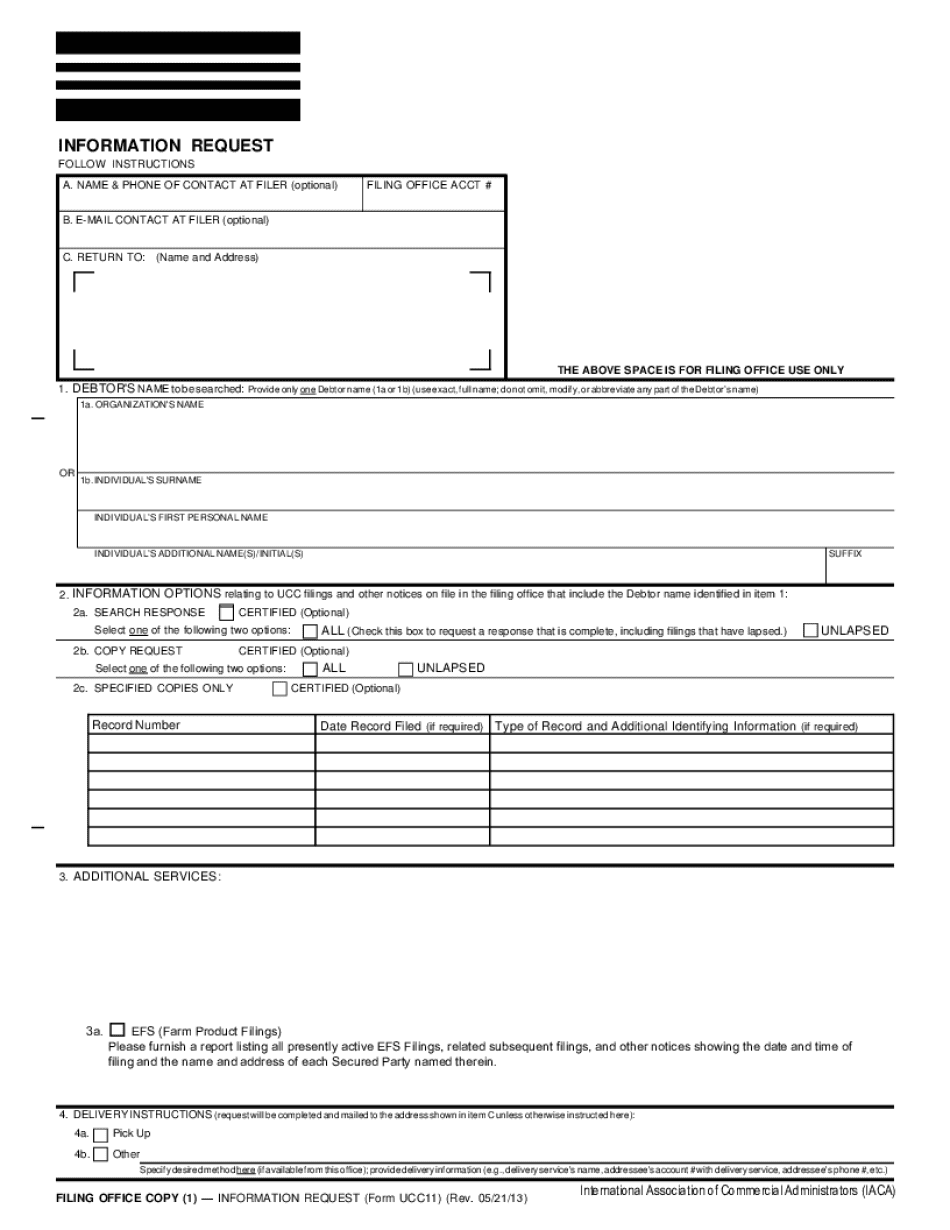
National Form Ucc 11
Use a National Form Ucc 11 Fillable template to make your document workflow more streamlined.
What National Form UCC 11 does
National Form Ucc 11 is a request for information about UCC financing statements, used to obtain a search response from the relevant filing office. It is not the financing statement itself and does not create a security interest. The requester identifies the debtor or search subject, selects the requested search scope, provides contact and delivery details, and submits the request under the applicable state Secretary of State process. A signed request can be completed through signNow, where the uploaded form can be prepared, routed, signed, and stored with an audit trail. Filing acceptance and search results remain controlled by the state office.
Who works with National Form UCC 11
A secured-lending analyst uses National Form Ucc 11 to request a debtor-name search before reviewing collateral records. The analyst can route the request internally, capture authorization, and retain the signed form with the state response for transaction diligence and later verification. A legal operations coordinator prepares National Form Ucc 11 requests for lien investigations across multiple transactions. signNow helps the coordinator standardize fields, obtain the responsible attorney’s signature, and preserve the completed request and audit evidence without confusing the request with a UCC-1 filing itself.
Who uses National Form UCC 11
Secured lending
Lenders, secured parties, attorneys, and due-diligence teams use National Form Ucc 11 to request searchable UCC filing information before evaluating collateral or closing a transaction. They should verify the debtor name, jurisdiction, search scope, and delivery instructions against the filing office’s requirements.
Corporate diligence
Corporate legal departments and compliance teams use the request to document lien searches connected with acquisitions, financing, and vendor diligence. A completed signNow record can show who approved the request, when it was signed, and which search response was received.
Complete National Form UCC 11 online
Use this signNow workflow to prepare the request, capture authorization, and preserve evidence before state submission.
Upload the form:
Upload the National Form Ucc 11 file. Review the fields:
Check debtor and search details. Route for signature:
Add the authorized signer. Preserve the record:
Download the signed request and audit trail.
Recommended National Form UCC 11 setup
Configure the request around signer identity, evidence preservation, controlled access, and the filing office’s requirements.
| Setting | Recommendation |
|---|---|
| Authentication method | SMS verification for external signers |
| Signature type | Electronic signature with signer intent |
| Audit trail | Export with the completed request |
| Document retention | Apply the governing state records policy |
| Encryption | AES-256 at rest and TLS in transit |
 Best ROI. Our customers achieve an average 7x ROI within the first six months.
 Scales with your use cases. From SMBs to mid-market, airSlate SignNow delivers results for businesses of all sizes.
 Intuitive UI and API. Sign and send documents from your apps in minutes.
Audit trail for National Form UCC 11
The audit trail records signing evidence separately from the state’s search response, creating a traceable package for transaction records.
Authenticate signer:
Timestamp events:
Hash document:
Seal record:
Export evidence:
Archive package:
Protect National Form UCC 11 records
Data at rest:
Data in transit:
Independent controls:
Information security:
Electronic signature law:
Protected health data:
Platform requirements for National Form UCC 11
Complete National Form Ucc 11 in Chrome, Firefox, Safari, or Edge on Windows or macOS, or use signNow mobile apps on iOS and Android.
Desktop browsers Chrome, Firefox, Safari, Edge Operating systems Windows, macOS, iOS, Android Secure connection TLS 1.2 or 1.3 connection
Organizations preparing repeated UCC-11 requests should use managed Windows, macOS, iOS, or Android devices, current browser security updates, and TLS-protected connections. Enterprise teams can also evaluate API access, SSO provisioning, and certificate or long-term validation requirements against their records policy before deployment.



Retain National Form UCC 11 records carefully
Retention depends on the related transaction and state filing practice, so preserve the request, evidence, and audit history together.
Document the applicable retention rule
Export the audit trail immediately
Archive the complete filing package securely
Preserve state filing evidence
Check state rules before submitting UCC-11
Confirm Secretary of State rules
Real-estate deeds need formal recording
Wills and court orders remain excluded
Divorce and adoption decrees remain excluded
Avoid National Form UCC 11 workflow errors
Entering a debtor name that differs from the filing record can produce an incomplete or misleading UCC search response. Sending a signed National Form Ucc 11 without confirming the correct state filing office can delay retrieval or require resubmission. Sharing the completed request and search response through unrestricted links can expose debtor information to unauthorized recipients. Treating National Form Ucc 11 as a UCC-1 filing can create a serious transaction-control and documentation error.
Legal standing of National Form UCC 11
A National Form Ucc 11 request can be supported by an electronic signature when the signer demonstrates intent, consents to electronic records, can be identified, and the record remains reproducible under ESIGN, 15 U.S.C. chapter 96, and applicable state law. Those rules do not cover wills, certain court orders, or family-law decrees.

Troubleshoot National Form UCC 11 workflows
These answers separate the UCC-11 request from state filing decisions and explain how signNow evidence supports the completed document.
National Form Ucc 11 requests information about UCC filings; it is not a UCC-1 financing statement. Use the correct state form and filing process, then retain the search response separately from the signed request.
Check the debtor name, jurisdiction, search scope, and delivery instructions before sending. signNow can route the form for signature and preserve an audit trail, but the Secretary of State determines search scope, fees, acceptance, and response format.
The signNow Business plan includes templates, audit trails, mobile apps, and legally binding eSignatures at $8 per user per month when billed annually. Confirm the state’s filing requirements separately before relying on the completed request.
For a consumer-facing electronic record, ESIGN requires disclosure of the right to receive paper records, access to the electronic format, and procedures for withdrawing consent under 15 U.S.C. §7001(c). Apply those requirements when the requester is a consumer.
Export the signNow Audit Trail and certificate of completion with the signed National Form Ucc 11. The audit evidence can document intent, attribution, timestamps, and actions, while the state receipt proves what was submitted to the filing office.
National Form Ucc 11 does not replace wills, codicils, testamentary trusts, court orders, or family-law decrees excluded by ESIGN’s statutory framework. For deeds and other recorded instruments, follow the applicable state recording and notarization rules.
Key performance indicators that demonstrate SignNow's proven track record.
BE READY TO GET MORE
Get this form now!

If you believe that this page should be taken down, please follow our DMCA take-down process.